Instant Connection for Pixel Streaming
— New Feature Automated Setup

Top Azure Virtual Desktop Alternatives in 2026
Top Azure Virtual Desktop Alternatives in 2026
Top Azure Virtual Desktop Alternatives in 2026
Published on March 5, 2026
Table of Contents
Azure Virtual Desktop sounded like the obvious choice for a lot of teams a few years ago. Microsoft ecosystem. Enterprise security. Flexible scaling. On paper, it checks almost every box.
Then the first real deployment happens.
Suddenly the conversation shifts from “remote desktops” to networking rules, image management, autoscaling policies, and a billing dashboard that seems to grow new line items every month. I’ve seen teams go in expecting a simple cloud desktop setup and come out realizing they’ve basically rebuilt part of their infrastructure inside Azure.
That doesn’t mean Azure Virtual Desktop is a bad platform. Far from it. For organizations already deeply invested in Microsoft services, it can work extremely well. But it also assumes something important. That your team is comfortable managing cloud infrastructure and all the moving parts that come with it.
And that’s where the friction starts to show up.
Design teams struggling with GPU workloads. AI engineers needing faster environments. Contractors waiting days for access to a configured workspace. IT teams spending more time maintaining desktop infrastructure than they originally planned.
At some point, a pretty simple question starts floating around.
Is Azure Virtual Desktop actually the best way to deliver cloud workspaces?
For some organizations the answer is still yes. But many VDI users are starting to explore other options that are easier to manage, more predictable in cost, or simply better suited for modern workloads.
If you are still deciding between Microsoft’s cloud desktop options, it’s worth understanding the differences between the two services. This guide on Windows 365 vs Azure Virtual Desktop explains when each platform makes the most sense for different teams.
Why Teams Start Looking for Azure Virtual Desktop Alternatives
Most teams don’t start out looking for alternatives. They usually get there after living with Azure Virtual Desktop for a while.
At first, things work. The desktops launch, users can log in, files are accessible. Mission accomplished. But once usage grows and more people depend on the system, a few cracks tend to appear.
Infrastructure Complexity
Azure Virtual Desktop isn’t just a desktop platform. It’s a collection of Azure services working together.
You’re dealing with host pools, virtual networks, storage accounts, image management, identity integration, scaling rules, monitoring tools. Each piece makes sense on its own, but together they form a system that needs real attention.
For companies with a dedicated cloud team, that’s normal. For smaller teams or fast-moving startups, it can feel like running a mini data center again. Just in the cloud.
I’ve seen organizations underestimate this part the most. The desktops themselves are easy. Keeping everything optimized is where the work begins.
Costs Can Be Hard to Predict
Azure’s pricing model is powerful but not always straightforward.
You’re paying for compute, storage, networking, and sometimes GPU instances. Add autoscaling into the mix and the monthly bill can fluctuate more than expected.
A few idle machines left running overnight might not sound like a big deal. Multiply that across dozens or hundreds of users and suddenly it shows up on the finance team’s radar.
Predictable budgeting becomes tricky.
GPU Workloads Push the Limits
For standard office work, Azure Virtual Desktop performs well. Browsers, spreadsheets, internal tools. No problem.
But once teams start running heavier workloads, things change.
Think about teams working with:
3D modeling
video production
AI experimentation
simulation tools
Those environments often require strong GPU resources and low latency. Configuring that properly inside a traditional VDI setup can become a project on its own.
The User Experience Problem
This is the one people rarely mention in architecture diagrams.
Users don’t care about host pools or infrastructure layers. They care about one thing.
“How fast can I open my workspace and start working?”
If onboarding a new teammate takes hours of setup, or if spinning up a new machine requires IT tickets, productivity starts to slip. Slowly at first. Then noticeably.
And that’s usually the moment teams begin looking around at other options.
Not necessarily to replace Azure entirely. Sometimes they just want something simpler for specific workloads.

What Actually Matters in a VDI Platform
When people start comparing Azure Virtual Desktop with other solutions, the conversation often gets lost in feature lists. Protocols, licensing models, integrations. All useful things, sure. But most teams care about a much smaller set of questions.
The real test is simple. How easy is it to run, how well does it perform, and how quickly can users get to work?
Performance (Especially for Heavy Workloads)
Performance is usually the first thing users notice.
For basic office work, almost any modern VDI platform will feel fine. Email, spreadsheets, internal apps. These don’t push the limits of a virtual machine.
But workloads like 3D design, video editing, or machine learning are a different story. They rely heavily on GPU acceleration and stable streaming performance. If the infrastructure isn’t tuned correctly, users feel lag immediately. Cursor delays, dropped frames, slow rendering.
Not ideal when someone’s trying to finish a design review or train a model.
Management Overhead
Some VDI platforms give you a lot of control. Which sounds great at first. Until you realize control also means responsibility.
Traditional VDI often requires managing images, security policies, updates, networking rules, scaling strategies, and monitoring tools. For large IT teams, that’s manageable. For smaller teams, it can become a constant background task.
Many organizations are now leaning toward Desktop as a Service platforms where most of the infrastructure management disappears.
Less tuning. Less babysitting.
If you are exploring simpler alternatives to managing full VDI infrastructure, many organizations are now evaluating Desktop-as-a-Service solutions. This list of the best Desktop-as-a-Service (DaaS) platforms provides a broader look at the leading options available today.
Scalability
Modern teams don’t always have static user groups.
Contractors come in for three months. Designers join for a project sprint. AI engineers need powerful machines for a week of experimentation.
The VDI platform needs to handle those spikes without turning provisioning into a manual process.
Spinning up a new environment should take minutes, not days.
Security
One reason VDI became popular in the first place was security.
Instead of sensitive data living on dozens of personal laptops, everything stays inside a controlled environment. Files remain on centralized systems, access can be monitored, and permissions can be adjusted quickly when people join or leave a project.
For industries handling confidential data, that’s still a huge advantage.
Deployment Speed
This one gets overlooked surprisingly often.
How long does it take to get a new user fully operational?
If onboarding someone means configuring infrastructure, cloning images, assigning resources, and troubleshooting access permissions, the process slows down fast.
The best platforms remove as many of those steps as possible.
Because at the end of the day, the goal isn’t to manage virtual desktops.
The goal is to help people start working as quickly as possible.
If you are researching the broader VDI ecosystem beyond Azure, Citrix, or VMware, it helps to look at the full landscape of providers. This overview of the best virtual desktop infrastructure (VDI) platforms compares the major solutions organizations use today.
3 Popular Azure Virtual Desktop Alternatives
Once teams start exploring alternatives, they usually run into the same handful of names. Some have been around since the early days of desktop virtualization. Others grew alongside cloud infrastructure over the last decade.
None of them are perfect replacements for Azure Virtual Desktop. Each comes with its own strengths, trade-offs, and ideal use cases. The right choice often depends less on features and more on the environment your company already runs.
Here are three of the most commonly considered options.
1. Citrix DaaS
If you’ve worked in VDI for any length of time, Citrix probably comes up quickly in the conversation.
Citrix has been delivering remote desktops long before cloud VDI became mainstream. Over the years it built a reputation for strong performance, mature management tools, and the kind of security controls large enterprises expect. Their modern platform, Citrix DaaS, continues that tradition while adding cloud-hosted deployment options.
One of Citrix’s biggest strengths is its display protocol. HDX is designed to optimize how graphics and user inputs travel between the data center and the user’s device. That matters more than people think. A good protocol can make a remote desktop feel surprisingly close to a local machine.

Large organizations also appreciate the control Citrix offers. IT teams can fine-tune policies, manage hybrid environments, and support thousands of users across multiple locations.
But there’s a catch.
Citrix environments can become complicated to deploy and maintain. Licensing structures are not always straightforward, and configuring a large deployment often requires experienced administrators. For companies that already have Citrix expertise internally, that’s manageable. For smaller teams, it can feel heavy.
In short, Citrix is powerful. Just not lightweight.
2. VMware Horizon
VMware Horizon is another platform that frequently shows up when companies evaluate Azure Virtual Desktop alternatives.
It comes from the same ecosystem that powers a huge portion of enterprise virtualization infrastructure. If an organization already relies on VMware for servers, networking, or storage virtualization, Horizon fits naturally into that environment.
The platform allows companies to deliver virtual desktops from on-premise infrastructure, public clouds, or a hybrid combination of both. That flexibility is one of its biggest advantages. Some organizations prefer keeping certain workloads on their own infrastructure while using cloud resources for burst capacity.
VMware Horizon also includes centralized management tools that help IT teams control policies, manage images, and monitor performance across large deployments.

But again, complexity can creep in.
Running Horizon often means maintaining the broader VMware stack alongside it. Licensing costs, infrastructure planning, and ongoing management can add up quickly. It works best for organizations that are already comfortable operating VMware environments.
If that’s the case, Horizon can feel like a natural extension of the existing infrastructure.
If not, the learning curve might be steeper than expected.
3. Amazon WorkSpaces
Amazon approached the virtual desktop problem a little differently.
Instead of focusing heavily on infrastructure control, Amazon WorkSpaces leans toward the Desktop as a Service model. Much of the backend environment is handled by AWS itself, which reduces the amount of configuration customers need to manage.
For teams already running workloads in AWS, this approach makes a lot of sense. Identity management, networking, and storage can integrate directly with existing AWS services. Deploying new desktops becomes a relatively straightforward process.
Users can access their desktops from Windows, macOS, Linux, tablets, and even web browsers. That device flexibility has made WorkSpaces attractive for distributed teams and remote workers.
Pricing is also relatively flexible. Companies can choose hourly billing or monthly subscriptions depending on how consistently their users need access to virtual machines.

Still, it isn’t perfect.
Customization options are more limited compared to fully managed VDI environments, and organizations that need very specific infrastructure configurations might feel constrained. Performance tuning also depends heavily on selecting the right instance types within AWS.
For teams already invested in the AWS ecosystem though, Amazon WorkSpaces can feel like the most natural alternative to Azure Virtual Desktop.
And yet, after evaluating platforms like Citrix, VMware Horizon, or Amazon WorkSpaces, many teams come to an interesting realization.
They might not actually need traditional VDI at all.
If you are still evaluating whether cloud desktops are the right direction for your organization, it can help to compare them with traditional setups. This breakdown of on-premise vs cloud desktops explains the trade-offs between the two approaches.
The Problem With Traditional VDI (That No One Talks About)
Here’s something I’ve noticed after talking with a lot of teams using VDI.
Many of them didn’t actually want VDI in the first place.
What they wanted was a simple way to give people access to powerful machines from anywhere. That’s it. But the tools available at the time pushed everyone toward full virtual desktop infrastructure.
And VDI was built for a very specific era.
It was designed when companies needed centralized desktops for thousands of employees working inside tightly controlled corporate networks. Security, compliance, centralized IT control. Those were the priorities.
So the architecture reflects that.
Host pools. Image management. Persistent desktops. Network configuration. Identity layers. Scaling policies. Monitoring tools.
It works. But it’s heavy.
The funny thing is that a lot of modern teams don’t actually need that level of infrastructure anymore.

Think about how many teams today operate:
A design team that needs GPU machines for rendering.
An AI team running experiments for a few weeks.
A studio onboarding freelancers for a project.
A startup giving temporary environments to contractors.
In those cases, the goal isn’t to manage long-lived virtual desktops. The goal is simply to give someone a powerful machine they can access instantly.
Traditional VDI still has its place. Large enterprises with strict security requirements and thousands of employees benefit from centralized desktop environments.
But for many modern workflows, the complexity starts to outweigh the benefits.
Which is why a different approach has started gaining traction over the last few years.
Instead of managing virtual desktops, teams are moving toward cloud workstations.
A New Approach: Cloud Workstations Instead of VDI
This is where the conversation around remote work environments has started to shift.
Instead of building large virtual desktop infrastructures, many teams are moving toward something simpler. Cloud workstations.
At a basic level, the idea is straightforward. Instead of maintaining a full VDI system with host pools, image pipelines, and scaling policies, you spin up individual high-performance machines in the cloud and access them remotely.
No complex infrastructure layers. No long deployment process.
Just a powerful machine running somewhere else.
For certain workloads, this model makes a lot more sense.
Take a design team working with heavy 3D files. They don’t necessarily need persistent virtual desktops running all day. What they need is access to a GPU workstation when they’re actively working. Same thing for AI engineers running experiments or studios rendering animation frames overnight.

Cloud workstations are built for that kind of flexibility.
You can start a machine when you need it, shut it down when you don’t, and scale resources depending on the workload. Need a stronger GPU for a rendering job? Spin up a larger instance. Running lightweight development tasks today? Use something smaller.
It also removes a lot of the infrastructure overhead that traditional VDI requires.
Instead of configuring host pools, networking layers, and image management pipelines, teams interact with machines more directly. Provisioning becomes faster. In many cases, users can create environments themselves without waiting for IT tickets.
That shift has been particularly helpful for teams working with external collaborators.
Freelancers, contractors, research partners. Instead of shipping hardware or setting up complicated VPN access, companies can simply provide a secure cloud environment that’s accessible through a browser or lightweight client.
No files leaving the environment. No complicated onboarding process.
The workstation lives in the cloud, and everyone connects to it.
And this is exactly the space where newer platforms have started focusing their efforts. Platforms designed not around managing desktops at scale, but around making powerful cloud machines easy to use and share.
If you are working with simulation environments or real-time modeling systems, you might also run into workloads like digital twin platforms, which often require powerful GPU-enabled workstations to run effectively.
Where Vagon Teams Fits In
After looking at the usual Azure Virtual Desktop alternatives, something becomes pretty clear.
Most of them still follow the same model. Large VDI infrastructure, complex configuration, and a fair amount of IT oversight to keep everything running smoothly. Citrix, VMware, AWS. They solve the problem in slightly different ways, but the architecture underneath is still traditional desktop virtualization.
And that works. Especially for large enterprises.
But if your team simply needs powerful cloud machines that are easy to access and share, the whole VDI approach can start to feel like overkill.
This is where Vagon Teams comes in.
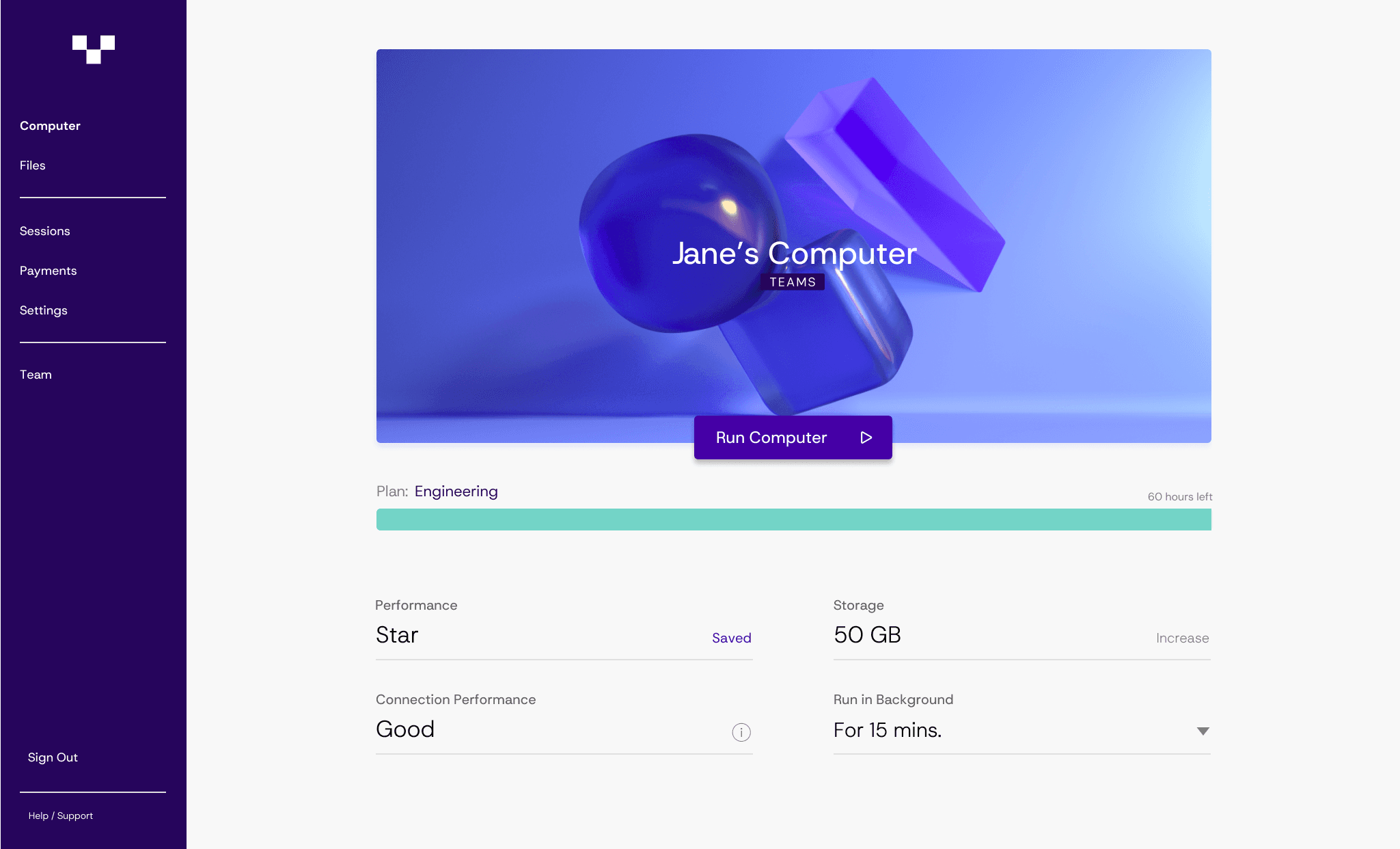
Instead of asking you to build and manage a virtual desktop environment, Vagon Teams focuses on something much simpler. High-performance cloud workstations that your team can access instantly.
Open a browser. Launch a machine. Start working.
No host pools to configure.
No complex infrastructure layers.
No long setup process.
The platform is designed specifically for teams that rely on heavy applications or GPU power. Think 3D design, Unreal Engine projects, AI experimentation, simulation workloads, video production, or any workflow that normally requires a powerful local machine.
With Vagon Teams, those machines live in the cloud.
A designer can open Blender or Maya from a lightweight laptop.
An AI engineer can run experiments without worrying about local GPU limits.
A creative team can collaborate on the same environment without passing files around.
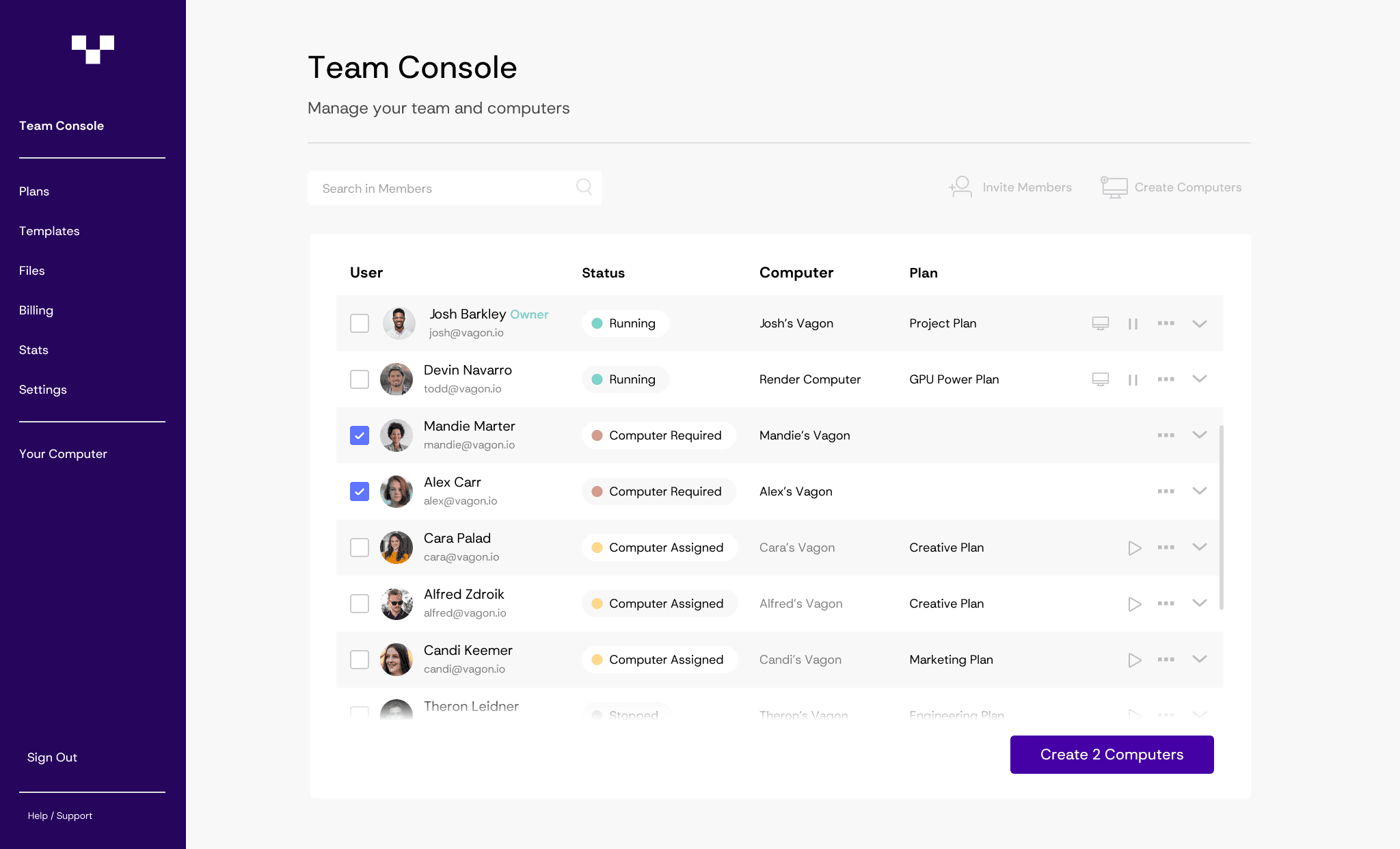
And sharing access is surprisingly simple.
Instead of provisioning desktops one by one, you can invite teammates directly into the workspace. They log in, open the environment, and everything they need is already there. Same tools, same files, same performance.
This makes a huge difference for teams working with freelancers, contractors, or external collaborators. Onboarding someone no longer means shipping hardware or walking them through a complicated setup process. You just give them access to the workspace.
They’re ready to go in minutes.
Another advantage is flexibility. Teams can scale resources depending on the workload. Need stronger GPU power for rendering or training a model? Launch a more powerful machine. Running lighter tasks this week? Use a smaller environment.
You only use what you actually need.
That kind of flexibility is why more teams are starting to rethink how they approach remote work environments. Instead of managing full virtual desktop infrastructures, they’re moving toward cloud workspaces that are faster to deploy and easier for teams to share.
And that’s exactly the experience Vagon Teams is designed to deliver.
How to Decide What’s Right for Your Team
At this point, the question isn’t really which platform is “best.” It’s more about what kind of environment your team actually needs.
Azure Virtual Desktop is still a strong option for many organizations. If your company already runs heavily on Microsoft services like Azure Active Directory, Microsoft 365, and other Azure infrastructure, keeping everything inside the same ecosystem can make a lot of sense. The integrations are tight, security controls are familiar, and IT teams often already know the tools.
The same logic applies to other platforms.
If your company has spent years building its infrastructure around VMware, VMware Horizon will probably feel like a natural extension of what you already run. If your workloads live inside AWS, Amazon WorkSpaces might be the easiest path forward because it fits directly into that ecosystem.
These platforms are powerful and proven. But they also assume something important. That your organization wants to operate and maintain a full VDI environment.
For many teams today, that assumption doesn’t always hold up.
Some teams don’t need persistent corporate desktops for hundreds or thousands of employees. They need powerful environments for specific workloads. Design projects, development tasks, AI experiments, temporary collaborations, or short-term contract work.
In those situations, simplicity starts to matter more than infrastructure flexibility.
That’s where platforms like Vagon Teams start to stand out. Instead of focusing on managing large desktop environments, the platform focuses on delivering powerful cloud machines that teams can access quickly and share easily.
No heavy setup process. No infrastructure layers to maintain.
Just a workspace that’s ready when your team is.
And sometimes, that’s exactly what people were hoping for when they started looking at cloud desktops in the first place.

Final Thoughts
Azure Virtual Desktop solved a real problem when cloud workspaces started becoming essential for distributed teams. Centralized desktops, strong security controls, and tight integration with the Microsoft ecosystem made it a natural choice for many organizations.
But the way teams work today is changing.
Not every company needs a fully managed virtual desktop infrastructure. Many teams are simply looking for a reliable way to access powerful machines from anywhere without spending weeks configuring environments or maintaining complex infrastructure.
That’s why exploring alternatives has become more common. Platforms like Citrix, VMware Horizon, and Amazon WorkSpaces offer different ways to approach VDI depending on your existing ecosystem and operational needs.
Still, for teams that want something faster and simpler, a new category of tools is starting to make more sense.
Cloud workspaces remove much of the operational overhead that traditional VDI systems require. Instead of managing desktop infrastructure, teams can focus on accessing the performance they need and collaborating more easily.
And that’s exactly where Vagon Teams shines.
If your team needs powerful GPU machines, flexible environments, and a simple way to share workspaces with collaborators, it offers a much lighter path than building a full VDI setup from scratch.
In the end, the best solution isn’t necessarily the most complex platform or the one with the longest feature list. It’s the one that helps your team start working quickly and stay productive without fighting the infrastructure behind the scenes.
Frequently Asked Questions
1. What is Azure Virtual Desktop?
Azure Virtual Desktop is a Microsoft cloud service that lets organizations run Windows desktops and apps in Azure and access them remotely. Instead of using a local machine, users connect to a cloud-hosted desktop through the internet. IT teams manage the environment centrally while users work from almost any device.
2. Why do companies look for Azure Virtual Desktop alternatives?
The most common reasons are complexity, cost control, and performance needs. Azure Virtual Desktop often requires managing several Azure services, which can add operational overhead. Some teams also look for simpler solutions when they need GPU power, faster onboarding, or easier workspace sharing.
3. What are the main alternatives to Azure Virtual Desktop?
Well-known alternatives include Citrix DaaS, VMware Horizon, and Amazon WorkSpaces. Each platform offers virtual desktop environments but differs in how infrastructure is managed and how well it integrates with existing ecosystems like VMware or AWS.
4. What’s the difference between VDI and cloud workstations?
VDI focuses on delivering centralized virtual desktops that IT teams manage and maintain over time. Cloud workstations provide individual high-performance machines that can be started on demand and accessed remotely. The main difference is complexity. VDI is infrastructure-heavy, while cloud workstations prioritize flexibility and quick access.
5. When should a team consider using Vagon Teams?
Teams often consider Vagon Teams when they need powerful cloud machines without running a full VDI setup. It works well for GPU-heavy workflows like design, simulation, or AI development, and it makes it easier to share workspaces with teammates, freelancers, or external collaborators.
Azure Virtual Desktop sounded like the obvious choice for a lot of teams a few years ago. Microsoft ecosystem. Enterprise security. Flexible scaling. On paper, it checks almost every box.
Then the first real deployment happens.
Suddenly the conversation shifts from “remote desktops” to networking rules, image management, autoscaling policies, and a billing dashboard that seems to grow new line items every month. I’ve seen teams go in expecting a simple cloud desktop setup and come out realizing they’ve basically rebuilt part of their infrastructure inside Azure.
That doesn’t mean Azure Virtual Desktop is a bad platform. Far from it. For organizations already deeply invested in Microsoft services, it can work extremely well. But it also assumes something important. That your team is comfortable managing cloud infrastructure and all the moving parts that come with it.
And that’s where the friction starts to show up.
Design teams struggling with GPU workloads. AI engineers needing faster environments. Contractors waiting days for access to a configured workspace. IT teams spending more time maintaining desktop infrastructure than they originally planned.
At some point, a pretty simple question starts floating around.
Is Azure Virtual Desktop actually the best way to deliver cloud workspaces?
For some organizations the answer is still yes. But many VDI users are starting to explore other options that are easier to manage, more predictable in cost, or simply better suited for modern workloads.
If you are still deciding between Microsoft’s cloud desktop options, it’s worth understanding the differences between the two services. This guide on Windows 365 vs Azure Virtual Desktop explains when each platform makes the most sense for different teams.
Why Teams Start Looking for Azure Virtual Desktop Alternatives
Most teams don’t start out looking for alternatives. They usually get there after living with Azure Virtual Desktop for a while.
At first, things work. The desktops launch, users can log in, files are accessible. Mission accomplished. But once usage grows and more people depend on the system, a few cracks tend to appear.
Infrastructure Complexity
Azure Virtual Desktop isn’t just a desktop platform. It’s a collection of Azure services working together.
You’re dealing with host pools, virtual networks, storage accounts, image management, identity integration, scaling rules, monitoring tools. Each piece makes sense on its own, but together they form a system that needs real attention.
For companies with a dedicated cloud team, that’s normal. For smaller teams or fast-moving startups, it can feel like running a mini data center again. Just in the cloud.
I’ve seen organizations underestimate this part the most. The desktops themselves are easy. Keeping everything optimized is where the work begins.
Costs Can Be Hard to Predict
Azure’s pricing model is powerful but not always straightforward.
You’re paying for compute, storage, networking, and sometimes GPU instances. Add autoscaling into the mix and the monthly bill can fluctuate more than expected.
A few idle machines left running overnight might not sound like a big deal. Multiply that across dozens or hundreds of users and suddenly it shows up on the finance team’s radar.
Predictable budgeting becomes tricky.
GPU Workloads Push the Limits
For standard office work, Azure Virtual Desktop performs well. Browsers, spreadsheets, internal tools. No problem.
But once teams start running heavier workloads, things change.
Think about teams working with:
3D modeling
video production
AI experimentation
simulation tools
Those environments often require strong GPU resources and low latency. Configuring that properly inside a traditional VDI setup can become a project on its own.
The User Experience Problem
This is the one people rarely mention in architecture diagrams.
Users don’t care about host pools or infrastructure layers. They care about one thing.
“How fast can I open my workspace and start working?”
If onboarding a new teammate takes hours of setup, or if spinning up a new machine requires IT tickets, productivity starts to slip. Slowly at first. Then noticeably.
And that’s usually the moment teams begin looking around at other options.
Not necessarily to replace Azure entirely. Sometimes they just want something simpler for specific workloads.
What Actually Matters in a VDI Platform
When people start comparing Azure Virtual Desktop with other solutions, the conversation often gets lost in feature lists. Protocols, licensing models, integrations. All useful things, sure. But most teams care about a much smaller set of questions.
The real test is simple. How easy is it to run, how well does it perform, and how quickly can users get to work?
Performance (Especially for Heavy Workloads)
Performance is usually the first thing users notice.
For basic office work, almost any modern VDI platform will feel fine. Email, spreadsheets, internal apps. These don’t push the limits of a virtual machine.
But workloads like 3D design, video editing, or machine learning are a different story. They rely heavily on GPU acceleration and stable streaming performance. If the infrastructure isn’t tuned correctly, users feel lag immediately. Cursor delays, dropped frames, slow rendering.
Not ideal when someone’s trying to finish a design review or train a model.
Management Overhead
Some VDI platforms give you a lot of control. Which sounds great at first. Until you realize control also means responsibility.
Traditional VDI often requires managing images, security policies, updates, networking rules, scaling strategies, and monitoring tools. For large IT teams, that’s manageable. For smaller teams, it can become a constant background task.
Many organizations are now leaning toward Desktop as a Service platforms where most of the infrastructure management disappears.
Less tuning. Less babysitting.
If you are exploring simpler alternatives to managing full VDI infrastructure, many organizations are now evaluating Desktop-as-a-Service solutions. This list of the best Desktop-as-a-Service (DaaS) platforms provides a broader look at the leading options available today.
Scalability
Modern teams don’t always have static user groups.
Contractors come in for three months. Designers join for a project sprint. AI engineers need powerful machines for a week of experimentation.
The VDI platform needs to handle those spikes without turning provisioning into a manual process.
Spinning up a new environment should take minutes, not days.
Security
One reason VDI became popular in the first place was security.
Instead of sensitive data living on dozens of personal laptops, everything stays inside a controlled environment. Files remain on centralized systems, access can be monitored, and permissions can be adjusted quickly when people join or leave a project.
For industries handling confidential data, that’s still a huge advantage.
Deployment Speed
This one gets overlooked surprisingly often.
How long does it take to get a new user fully operational?
If onboarding someone means configuring infrastructure, cloning images, assigning resources, and troubleshooting access permissions, the process slows down fast.
The best platforms remove as many of those steps as possible.
Because at the end of the day, the goal isn’t to manage virtual desktops.
The goal is to help people start working as quickly as possible.
If you are researching the broader VDI ecosystem beyond Azure, Citrix, or VMware, it helps to look at the full landscape of providers. This overview of the best virtual desktop infrastructure (VDI) platforms compares the major solutions organizations use today.
3 Popular Azure Virtual Desktop Alternatives
Once teams start exploring alternatives, they usually run into the same handful of names. Some have been around since the early days of desktop virtualization. Others grew alongside cloud infrastructure over the last decade.
None of them are perfect replacements for Azure Virtual Desktop. Each comes with its own strengths, trade-offs, and ideal use cases. The right choice often depends less on features and more on the environment your company already runs.
Here are three of the most commonly considered options.
1. Citrix DaaS
If you’ve worked in VDI for any length of time, Citrix probably comes up quickly in the conversation.
Citrix has been delivering remote desktops long before cloud VDI became mainstream. Over the years it built a reputation for strong performance, mature management tools, and the kind of security controls large enterprises expect. Their modern platform, Citrix DaaS, continues that tradition while adding cloud-hosted deployment options.
One of Citrix’s biggest strengths is its display protocol. HDX is designed to optimize how graphics and user inputs travel between the data center and the user’s device. That matters more than people think. A good protocol can make a remote desktop feel surprisingly close to a local machine.
Large organizations also appreciate the control Citrix offers. IT teams can fine-tune policies, manage hybrid environments, and support thousands of users across multiple locations.
But there’s a catch.
Citrix environments can become complicated to deploy and maintain. Licensing structures are not always straightforward, and configuring a large deployment often requires experienced administrators. For companies that already have Citrix expertise internally, that’s manageable. For smaller teams, it can feel heavy.
In short, Citrix is powerful. Just not lightweight.
2. VMware Horizon
VMware Horizon is another platform that frequently shows up when companies evaluate Azure Virtual Desktop alternatives.
It comes from the same ecosystem that powers a huge portion of enterprise virtualization infrastructure. If an organization already relies on VMware for servers, networking, or storage virtualization, Horizon fits naturally into that environment.
The platform allows companies to deliver virtual desktops from on-premise infrastructure, public clouds, or a hybrid combination of both. That flexibility is one of its biggest advantages. Some organizations prefer keeping certain workloads on their own infrastructure while using cloud resources for burst capacity.
VMware Horizon also includes centralized management tools that help IT teams control policies, manage images, and monitor performance across large deployments.
But again, complexity can creep in.
Running Horizon often means maintaining the broader VMware stack alongside it. Licensing costs, infrastructure planning, and ongoing management can add up quickly. It works best for organizations that are already comfortable operating VMware environments.
If that’s the case, Horizon can feel like a natural extension of the existing infrastructure.
If not, the learning curve might be steeper than expected.
3. Amazon WorkSpaces
Amazon approached the virtual desktop problem a little differently.
Instead of focusing heavily on infrastructure control, Amazon WorkSpaces leans toward the Desktop as a Service model. Much of the backend environment is handled by AWS itself, which reduces the amount of configuration customers need to manage.
For teams already running workloads in AWS, this approach makes a lot of sense. Identity management, networking, and storage can integrate directly with existing AWS services. Deploying new desktops becomes a relatively straightforward process.
Users can access their desktops from Windows, macOS, Linux, tablets, and even web browsers. That device flexibility has made WorkSpaces attractive for distributed teams and remote workers.
Pricing is also relatively flexible. Companies can choose hourly billing or monthly subscriptions depending on how consistently their users need access to virtual machines.
Still, it isn’t perfect.
Customization options are more limited compared to fully managed VDI environments, and organizations that need very specific infrastructure configurations might feel constrained. Performance tuning also depends heavily on selecting the right instance types within AWS.
For teams already invested in the AWS ecosystem though, Amazon WorkSpaces can feel like the most natural alternative to Azure Virtual Desktop.
And yet, after evaluating platforms like Citrix, VMware Horizon, or Amazon WorkSpaces, many teams come to an interesting realization.
They might not actually need traditional VDI at all.
If you are still evaluating whether cloud desktops are the right direction for your organization, it can help to compare them with traditional setups. This breakdown of on-premise vs cloud desktops explains the trade-offs between the two approaches.
The Problem With Traditional VDI (That No One Talks About)
Here’s something I’ve noticed after talking with a lot of teams using VDI.
Many of them didn’t actually want VDI in the first place.
What they wanted was a simple way to give people access to powerful machines from anywhere. That’s it. But the tools available at the time pushed everyone toward full virtual desktop infrastructure.
And VDI was built for a very specific era.
It was designed when companies needed centralized desktops for thousands of employees working inside tightly controlled corporate networks. Security, compliance, centralized IT control. Those were the priorities.
So the architecture reflects that.
Host pools. Image management. Persistent desktops. Network configuration. Identity layers. Scaling policies. Monitoring tools.
It works. But it’s heavy.
The funny thing is that a lot of modern teams don’t actually need that level of infrastructure anymore.
Think about how many teams today operate:
A design team that needs GPU machines for rendering.
An AI team running experiments for a few weeks.
A studio onboarding freelancers for a project.
A startup giving temporary environments to contractors.
In those cases, the goal isn’t to manage long-lived virtual desktops. The goal is simply to give someone a powerful machine they can access instantly.
Traditional VDI still has its place. Large enterprises with strict security requirements and thousands of employees benefit from centralized desktop environments.
But for many modern workflows, the complexity starts to outweigh the benefits.
Which is why a different approach has started gaining traction over the last few years.
Instead of managing virtual desktops, teams are moving toward cloud workstations.
A New Approach: Cloud Workstations Instead of VDI
This is where the conversation around remote work environments has started to shift.
Instead of building large virtual desktop infrastructures, many teams are moving toward something simpler. Cloud workstations.
At a basic level, the idea is straightforward. Instead of maintaining a full VDI system with host pools, image pipelines, and scaling policies, you spin up individual high-performance machines in the cloud and access them remotely.
No complex infrastructure layers. No long deployment process.
Just a powerful machine running somewhere else.
For certain workloads, this model makes a lot more sense.
Take a design team working with heavy 3D files. They don’t necessarily need persistent virtual desktops running all day. What they need is access to a GPU workstation when they’re actively working. Same thing for AI engineers running experiments or studios rendering animation frames overnight.
Cloud workstations are built for that kind of flexibility.
You can start a machine when you need it, shut it down when you don’t, and scale resources depending on the workload. Need a stronger GPU for a rendering job? Spin up a larger instance. Running lightweight development tasks today? Use something smaller.
It also removes a lot of the infrastructure overhead that traditional VDI requires.
Instead of configuring host pools, networking layers, and image management pipelines, teams interact with machines more directly. Provisioning becomes faster. In many cases, users can create environments themselves without waiting for IT tickets.
That shift has been particularly helpful for teams working with external collaborators.
Freelancers, contractors, research partners. Instead of shipping hardware or setting up complicated VPN access, companies can simply provide a secure cloud environment that’s accessible through a browser or lightweight client.
No files leaving the environment. No complicated onboarding process.
The workstation lives in the cloud, and everyone connects to it.
And this is exactly the space where newer platforms have started focusing their efforts. Platforms designed not around managing desktops at scale, but around making powerful cloud machines easy to use and share.
If you are working with simulation environments or real-time modeling systems, you might also run into workloads like digital twin platforms, which often require powerful GPU-enabled workstations to run effectively.
Where Vagon Teams Fits In
After looking at the usual Azure Virtual Desktop alternatives, something becomes pretty clear.
Most of them still follow the same model. Large VDI infrastructure, complex configuration, and a fair amount of IT oversight to keep everything running smoothly. Citrix, VMware, AWS. They solve the problem in slightly different ways, but the architecture underneath is still traditional desktop virtualization.
And that works. Especially for large enterprises.
But if your team simply needs powerful cloud machines that are easy to access and share, the whole VDI approach can start to feel like overkill.
This is where Vagon Teams comes in.
Instead of asking you to build and manage a virtual desktop environment, Vagon Teams focuses on something much simpler. High-performance cloud workstations that your team can access instantly.
Open a browser. Launch a machine. Start working.
No host pools to configure.
No complex infrastructure layers.
No long setup process.
The platform is designed specifically for teams that rely on heavy applications or GPU power. Think 3D design, Unreal Engine projects, AI experimentation, simulation workloads, video production, or any workflow that normally requires a powerful local machine.
With Vagon Teams, those machines live in the cloud.
A designer can open Blender or Maya from a lightweight laptop.
An AI engineer can run experiments without worrying about local GPU limits.
A creative team can collaborate on the same environment without passing files around.
And sharing access is surprisingly simple.
Instead of provisioning desktops one by one, you can invite teammates directly into the workspace. They log in, open the environment, and everything they need is already there. Same tools, same files, same performance.
This makes a huge difference for teams working with freelancers, contractors, or external collaborators. Onboarding someone no longer means shipping hardware or walking them through a complicated setup process. You just give them access to the workspace.
They’re ready to go in minutes.
Another advantage is flexibility. Teams can scale resources depending on the workload. Need stronger GPU power for rendering or training a model? Launch a more powerful machine. Running lighter tasks this week? Use a smaller environment.
You only use what you actually need.
That kind of flexibility is why more teams are starting to rethink how they approach remote work environments. Instead of managing full virtual desktop infrastructures, they’re moving toward cloud workspaces that are faster to deploy and easier for teams to share.
And that’s exactly the experience Vagon Teams is designed to deliver.
How to Decide What’s Right for Your Team
At this point, the question isn’t really which platform is “best.” It’s more about what kind of environment your team actually needs.
Azure Virtual Desktop is still a strong option for many organizations. If your company already runs heavily on Microsoft services like Azure Active Directory, Microsoft 365, and other Azure infrastructure, keeping everything inside the same ecosystem can make a lot of sense. The integrations are tight, security controls are familiar, and IT teams often already know the tools.
The same logic applies to other platforms.
If your company has spent years building its infrastructure around VMware, VMware Horizon will probably feel like a natural extension of what you already run. If your workloads live inside AWS, Amazon WorkSpaces might be the easiest path forward because it fits directly into that ecosystem.
These platforms are powerful and proven. But they also assume something important. That your organization wants to operate and maintain a full VDI environment.
For many teams today, that assumption doesn’t always hold up.
Some teams don’t need persistent corporate desktops for hundreds or thousands of employees. They need powerful environments for specific workloads. Design projects, development tasks, AI experiments, temporary collaborations, or short-term contract work.
In those situations, simplicity starts to matter more than infrastructure flexibility.
That’s where platforms like Vagon Teams start to stand out. Instead of focusing on managing large desktop environments, the platform focuses on delivering powerful cloud machines that teams can access quickly and share easily.
No heavy setup process. No infrastructure layers to maintain.
Just a workspace that’s ready when your team is.
And sometimes, that’s exactly what people were hoping for when they started looking at cloud desktops in the first place.
Final Thoughts
Azure Virtual Desktop solved a real problem when cloud workspaces started becoming essential for distributed teams. Centralized desktops, strong security controls, and tight integration with the Microsoft ecosystem made it a natural choice for many organizations.
But the way teams work today is changing.
Not every company needs a fully managed virtual desktop infrastructure. Many teams are simply looking for a reliable way to access powerful machines from anywhere without spending weeks configuring environments or maintaining complex infrastructure.
That’s why exploring alternatives has become more common. Platforms like Citrix, VMware Horizon, and Amazon WorkSpaces offer different ways to approach VDI depending on your existing ecosystem and operational needs.
Still, for teams that want something faster and simpler, a new category of tools is starting to make more sense.
Cloud workspaces remove much of the operational overhead that traditional VDI systems require. Instead of managing desktop infrastructure, teams can focus on accessing the performance they need and collaborating more easily.
And that’s exactly where Vagon Teams shines.
If your team needs powerful GPU machines, flexible environments, and a simple way to share workspaces with collaborators, it offers a much lighter path than building a full VDI setup from scratch.
In the end, the best solution isn’t necessarily the most complex platform or the one with the longest feature list. It’s the one that helps your team start working quickly and stay productive without fighting the infrastructure behind the scenes.
Frequently Asked Questions
1. What is Azure Virtual Desktop?
Azure Virtual Desktop is a Microsoft cloud service that lets organizations run Windows desktops and apps in Azure and access them remotely. Instead of using a local machine, users connect to a cloud-hosted desktop through the internet. IT teams manage the environment centrally while users work from almost any device.
2. Why do companies look for Azure Virtual Desktop alternatives?
The most common reasons are complexity, cost control, and performance needs. Azure Virtual Desktop often requires managing several Azure services, which can add operational overhead. Some teams also look for simpler solutions when they need GPU power, faster onboarding, or easier workspace sharing.
3. What are the main alternatives to Azure Virtual Desktop?
Well-known alternatives include Citrix DaaS, VMware Horizon, and Amazon WorkSpaces. Each platform offers virtual desktop environments but differs in how infrastructure is managed and how well it integrates with existing ecosystems like VMware or AWS.
4. What’s the difference between VDI and cloud workstations?
VDI focuses on delivering centralized virtual desktops that IT teams manage and maintain over time. Cloud workstations provide individual high-performance machines that can be started on demand and accessed remotely. The main difference is complexity. VDI is infrastructure-heavy, while cloud workstations prioritize flexibility and quick access.
5. When should a team consider using Vagon Teams?
Teams often consider Vagon Teams when they need powerful cloud machines without running a full VDI setup. It works well for GPU-heavy workflows like design, simulation, or AI development, and it makes it easier to share workspaces with teammates, freelancers, or external collaborators.
Scalable Remote Desktop for your Team
Create cloud computers for your Team, manage their access & permissions in real-time. Start in minutes & scale.
Trial includes 1 hour usage + 7 days of
storage for first 2 seats.
Scalable Remote Desktop for your Team
Create cloud computers for your Team, manage their access & permissions in real-time. Start in minutes & scale.
Trial includes 1 hour usage + 7 days of
storage for first 2 seats.

Ready to focus on your creativity?
Vagon gives you the ability to create & render projects, collaborate, and stream applications with the power of the best hardware.

Vagon Blog


Run heavy applications on any device with
your personal computer on the cloud.
San Francisco, California
Solutions
Vagon Teams
Vagon Streams
Use Cases
Resources
Vagon Blog
Best VMware Horizon Alternatives for VDI Teams in 2026
Top Citrix Alternatives in 2026
Top Azure Virtual Desktop Alternatives in 2026
Best Laptops of 2026: What Actually Matters
Best 3D Printers in 2026: Honest Picks, Real Use Cases
Best AI Productivity Tools in 2026: Build a Smarter Workflow
Best AI Presentation Tools in 2026: What Actually Works
Best Video Editing Software in 2026: Premiere Pro, DaVinci Resolve & More
The Best AI Video Generators in 2026: Tested Tools, Real Results
Vagon Blog
Run heavy applications on any device with
your personal computer on the cloud.
San Francisco, California
Solutions
Vagon Teams
Vagon Streams
Use Cases
Resources
Vagon Blog
Best VMware Horizon Alternatives for VDI Teams in 2026
Top Citrix Alternatives in 2026
Top Azure Virtual Desktop Alternatives in 2026
Best Laptops of 2026: What Actually Matters
Best 3D Printers in 2026: Honest Picks, Real Use Cases
Best AI Productivity Tools in 2026: Build a Smarter Workflow
Best AI Presentation Tools in 2026: What Actually Works
Best Video Editing Software in 2026: Premiere Pro, DaVinci Resolve & More
The Best AI Video Generators in 2026: Tested Tools, Real Results
Vagon Blog
Run heavy applications on any device with
your personal computer on the cloud.
San Francisco, California
Solutions
Vagon Teams
Vagon Streams
Use Cases
Resources
Vagon Blog
Best VMware Horizon Alternatives for VDI Teams in 2026
Top Citrix Alternatives in 2026
Top Azure Virtual Desktop Alternatives in 2026
Best Laptops of 2026: What Actually Matters
Best 3D Printers in 2026: Honest Picks, Real Use Cases
Best AI Productivity Tools in 2026: Build a Smarter Workflow
Best AI Presentation Tools in 2026: What Actually Works
Best Video Editing Software in 2026: Premiere Pro, DaVinci Resolve & More
The Best AI Video Generators in 2026: Tested Tools, Real Results
Vagon Blog
Run heavy applications on any device with
your personal computer on the cloud.
San Francisco, California
Solutions
Vagon Teams
Vagon Streams
Use Cases
Resources
Vagon Blog