Instant Connection for Pixel Streaming
— New Feature Automated Setup

Vagon vs RunPod: Which Cloud GPU Is Right for You? (2026 Comparison)
Vagon vs RunPod: Which Cloud GPU Is Right for You? (2026 Comparison)
Vagon vs RunPod: Which Cloud GPU Is Right for You? (2026 Comparison)
Table of Contents
Quick answer: RunPod gives you a headless GPU pod optimized for cheap raw compute, driven from a terminal or notebook. Vagon gives you a full GPU Ubuntu desktop you can see and drive from any device. Choose RunPod for the lowest cost per GPU-hour on headless training and inference. Choose Vagon when your work is visual or interactive, such as 3D, image generation, browser automation, or a watchable agent, and you want a real computer rather than a compute pod.
Key Takeaways
RunPod optimizes for raw GPU price with per-second billing and a broad catalog of high-end cards.
Vagon optimizes for a real desktop experience you can see, drive, and access from any device.
RunPod is headless, so you work through a terminal or a notebook; Vagon is a full graphical desktop.
For visual or interactive work, 3D, node-based image generation, GUI apps, watchable agents, Vagon fits better.
For the cheapest headless training and inference, RunPod usually wins on cost per GPU-hour.
Neither is a good 24/7 always-on server; both bill by usage and reward shutting down.
A comparison written by one of the two vendors deserves a healthy dose of suspicion, so here is mine right at the top. RunPod is good at what it does, and for a lot of workloads it's the right choice over Vagon. This isn't going to be a piece where the competitor mysteriously loses every round. It's going to be an actual guide to which tool fits which job, because they're built for different things and picking the wrong one just wastes your money.
Both give you an NVIDIA GPU in the cloud. That's where the similarity ends. The difference is what wraps around that GPU, and that difference should decide which one you pick.
The One-Sentence Version
RunPod gives you a headless GPU pod optimized for raw compute at a low per-hour price. Vagon gives you a full GPU Ubuntu desktop you can see and drive from any device. If you want the cheapest possible tokens or training throughput and you live in a terminal and a notebook, RunPod is likely your answer. If you want a real desktop, a graphical workflow, and something you can watch and operate like a normal computer, Vagon is built for that.
Now let's get specific.
What RunPod Is Great At
Credit where it's due.
Low per-hour GPU pricing
RunPod's whole model is efficient access to GPUs, including high-end cards, at competitive hourly and per-second rates. If your metric is dollars per GPU-hour, RunPod is hard to beat, especially for the big training and inference cards. For cost-sensitive raw compute, that's a genuine strength.
Per-second billing
RunPod bills very granularly. For short, spiky jobs that's genuinely efficient, because you pay for the seconds you use rather than rounding up. If your workload is many brief bursts, that granularity adds up in your favor.
A big catalog of GPUs
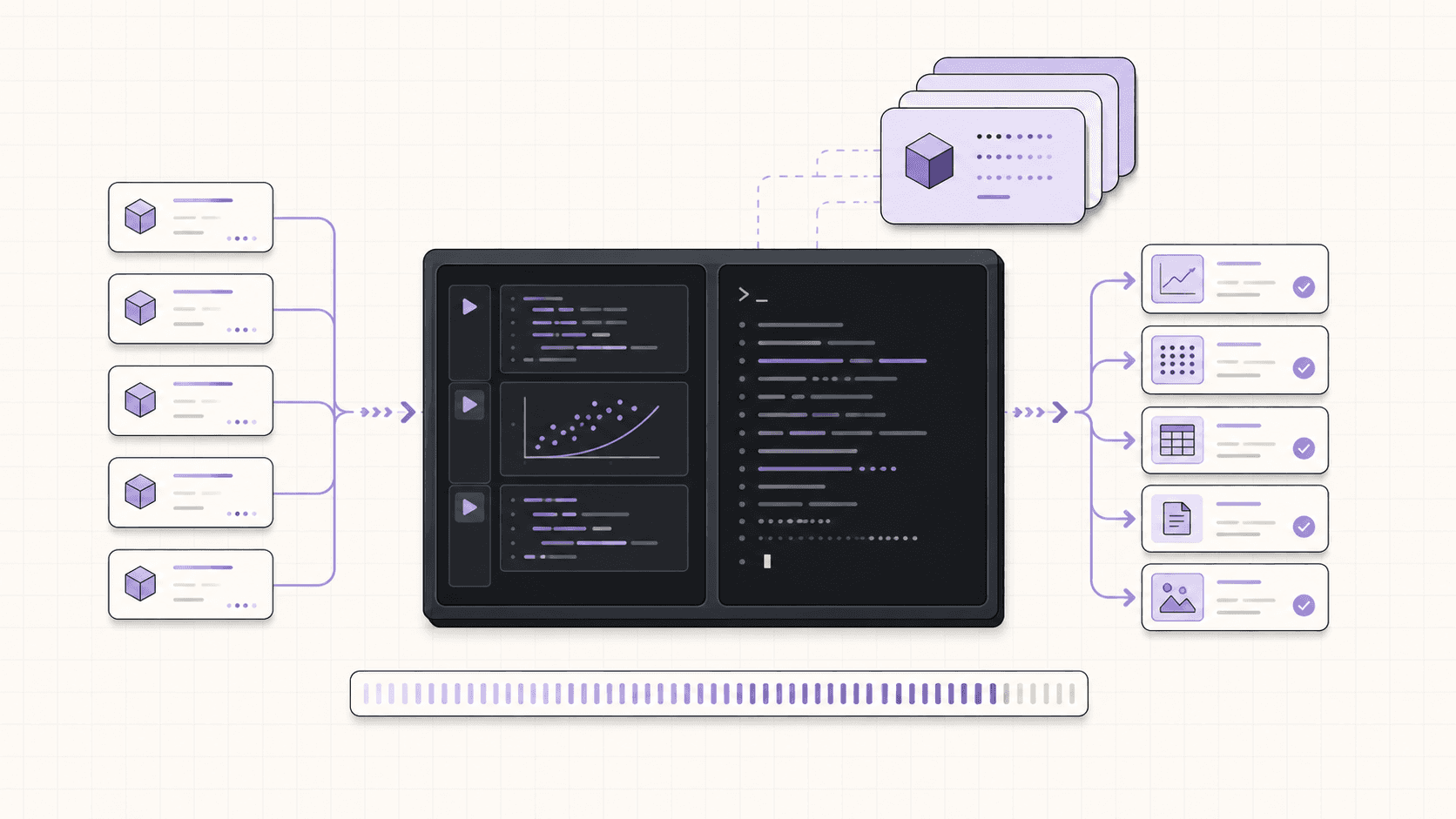
From mid-range cards up to top-tier data-center GPUs, RunPod offers a wide range. If you specifically need a particular high-end card for heavy training, there's a good chance they have it, and often in multiple regions.
Container and template workflow
RunPod is container-native. You pick a template, it spins up, and you get a Jupyter interface or an SSH connection. For ML engineers comfortable with that flow, it's fast, reproducible, and familiar. Defining your environment as a container image means you can recreate it reliably.
If your work is headless training, batch inference, or notebook-driven experimentation, and your top priority is cost per GPU-hour, RunPod is a strong, sensible choice. I'm not going to pretend otherwise.
If you’re looking for a full Linux environment without setting up local hardware, this guide explains how to get an Ubuntu desktop in the cloud.
What Vagon Is Great At
Now the other side.
A full desktop you can see and drive
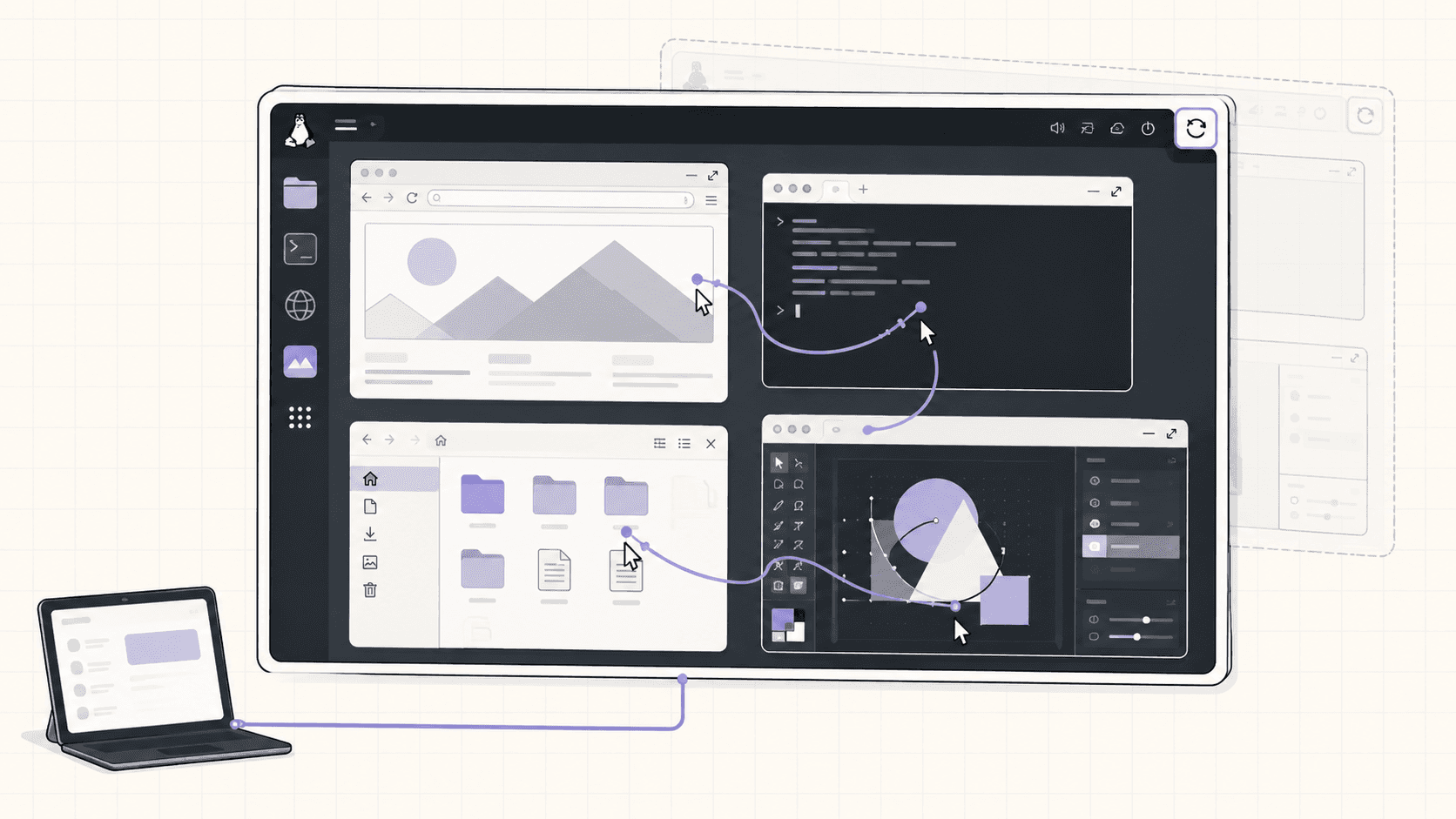
This is the core difference. Vagon isn't a headless pod with a notebook tab. It's a complete Ubuntu GNOME desktop, streamed to your browser, iPad, or Mac at up to 4K and 60 frames per second. You open real applications, drag windows, use a file manager, run a browser. For any workflow that's visual or interactive, that's a fundamentally nicer experience than tunneling a port into a headless box.
Tools that want a GUI
Some work is just better with a screen. Blender's viewport. ComfyUI's node editor. A browser-driving AI agent you want to watch. A creative app. A database GUI. On Vagon these run the way they were designed to, on a desktop, not squeezed through a forwarded port. If your daily work involves looking at things and clicking on them, that matters enormously.
Any device, including thin ones
Because Vagon streams a desktop, you can drive a powerful GPU Linux machine from an iPad, a Chromebook, or an old laptop. The device in your hands doesn't need to be powerful. That's a different promise from "SSH in from your workstation," and it's genuinely freeing if you want to work from a tablet or a light laptop.
Isolated, disposable, and easy to reset
Every Vagon machine is a separate VM you can reset to a clean image. That's great for running things you don't fully trust, like an autonomous agent installing its own packages, without risking your real environment.
Simple, no-container workflow
Launch a machine, pick Ubuntu, and in about 90 seconds you have a working desktop. No container mental model required. For people who want "a Linux computer in the cloud" rather than "a compute pod," that simplicity is the point.
Feature Comparison Table
Feature | RunPod | Vagon |
|---|---|---|
Interface | Headless (terminal, notebook, SSH) | Full Ubuntu GNOME desktop |
See and drive a GUI | No | Yes, streamed up to 4K/60 |
Access from thin devices | Via SSH from a capable machine | Yes, iPad, Chromebook, browser |
GPU catalog | Broad, including top-tier training cards | NVIDIA T4, A10G, and higher plans |
Billing granularity | Per second | Per minute |
Raw GPU price | Very competitive | Higher (you're paying for the desktop too) |
Environment model | Container templates | A real machine you set up |
Best for | Cheap headless compute | Visual, interactive, watchable work |
Isolation | Container on a host | Separate VM, resettable |
24/7 always-on server | Not the point | Not the point |
Where Each One Honestly Wins
Let me put it plainly, job by job.
Choose RunPod if
Your priority is the lowest possible cost per GPU-hour.
You're doing headless training or batch inference and are happy in a terminal and a notebook.
You need a specific high-end data-center GPU for heavy training.
Per-second billing on short spiky jobs matters to you.
You don't need a desktop, a GUI, or to watch anything happen.
Choose Vagon if
You want a real desktop you can see and operate, not a headless pod.
Your work is visual or interactive: 3D, image generation with a node UI, creative apps, browser automation, a watchable AI agent.
You want to drive a GPU Linux machine from an iPad, Chromebook, or weak laptop.
You value an isolated, disposable VM you can reset in one click.
You want "a Linux computer in the cloud" without a container workflow.
The Cost Conversation
Here's where I'll be direct, because cost is usually the real question.
RunPod generally wins on raw price per GPU-hour. If you're renting a card purely for compute and you'll drive it from a terminal, RunPod's per-hour and per-second pricing is very efficient. Vagon isn't trying to be the cheapest raw-compute provider, and pretending otherwise would insult your intelligence.
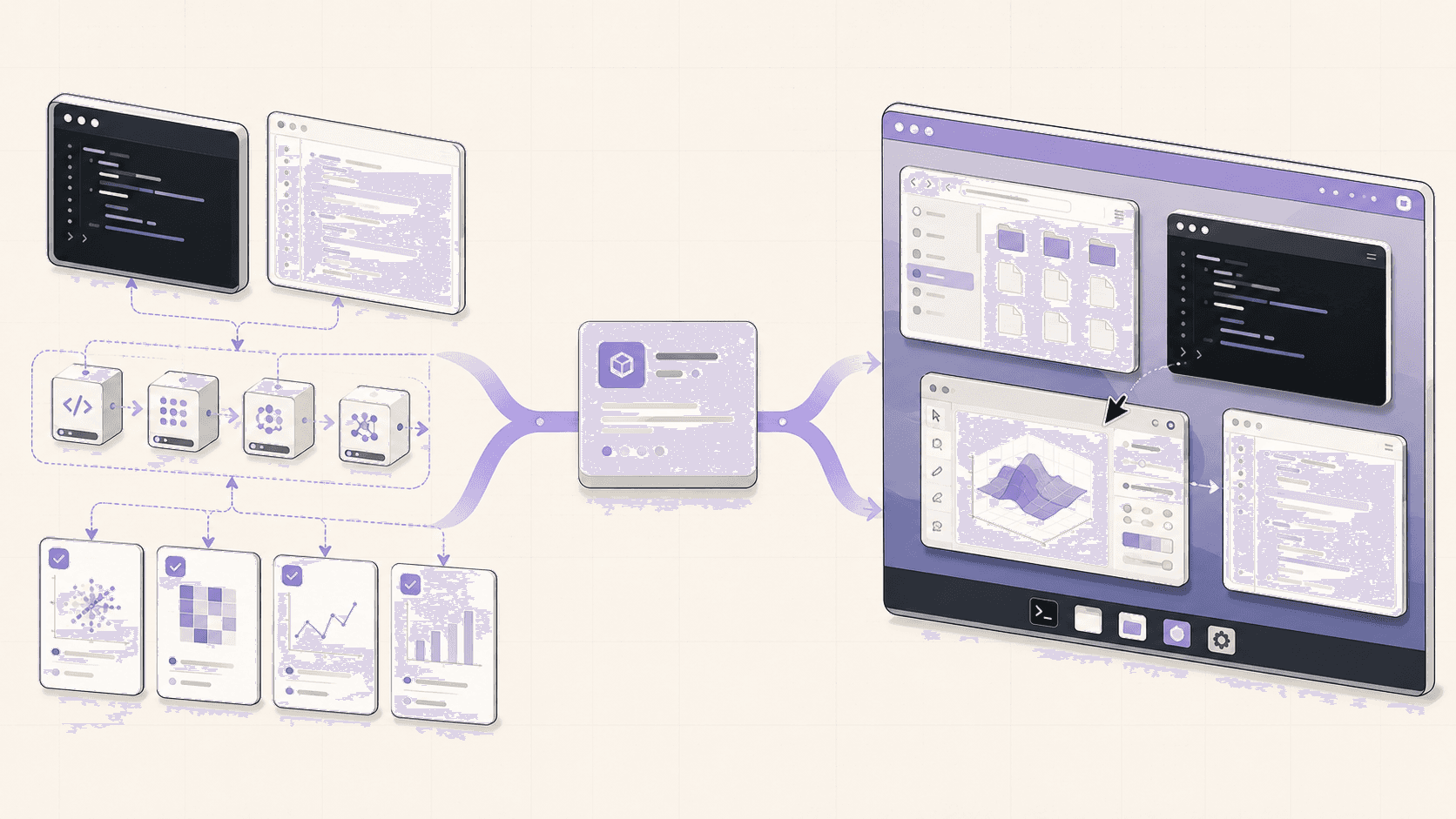
What Vagon charges for is the desktop, the streaming, the any-device access, the isolation, and the "it just works as a computer" experience. For workflows where those things matter, that's real value. For workflows where they don't, you're paying for a desktop you'd never look at, and RunPod is the better deal.
It's worth thinking about total value rather than only the sticker price per hour, though. If a real desktop saves you setup time, lets you work visually, and means you can drive the machine from a tablet, that convenience has worth. And if it doesn't, if you'd genuinely never open the desktop, then it's pure overhead and you should take RunPod's cheaper compute. The honest framing is: pay for the desktop when you'll use it, and don't when you won't.
Both bill by usage, so both reward shutting the machine down when you're done. Neither is a good choice for parking a lightweight always-on service around the clock; that's what a cheap dedicated VPS is for, and it beats both of these for that specific job.
If you’re working from a tablet, you can learn how to run Ubuntu on an iPad and access a complete Linux desktop remotely.
What Setup Actually Feels Like On Each
A practical difference that doesn't show up in a pricing table but matters day to day.
On RunPod, you're working in a container mindset. You pick a template or an image, the pod spins up, and you connect through a Jupyter tab or SSH. For people fluent in that workflow it's fast and clean, and the reproducibility of container images is a real plus for teams. For people who aren't steeped in containers, there's a small learning curve around images, volumes, and exposing ports.
On Vagon, there's no container mental model to learn. You pick Ubuntu, choose a plan, and about 90 seconds later you're looking at a desktop. You install software the way you would on any Linux machine, open apps, and work. If "just give me a Linux computer" is what you want, that simplicity is the appeal. If you specifically want reproducible container images defined as code, RunPod's model suits that better.
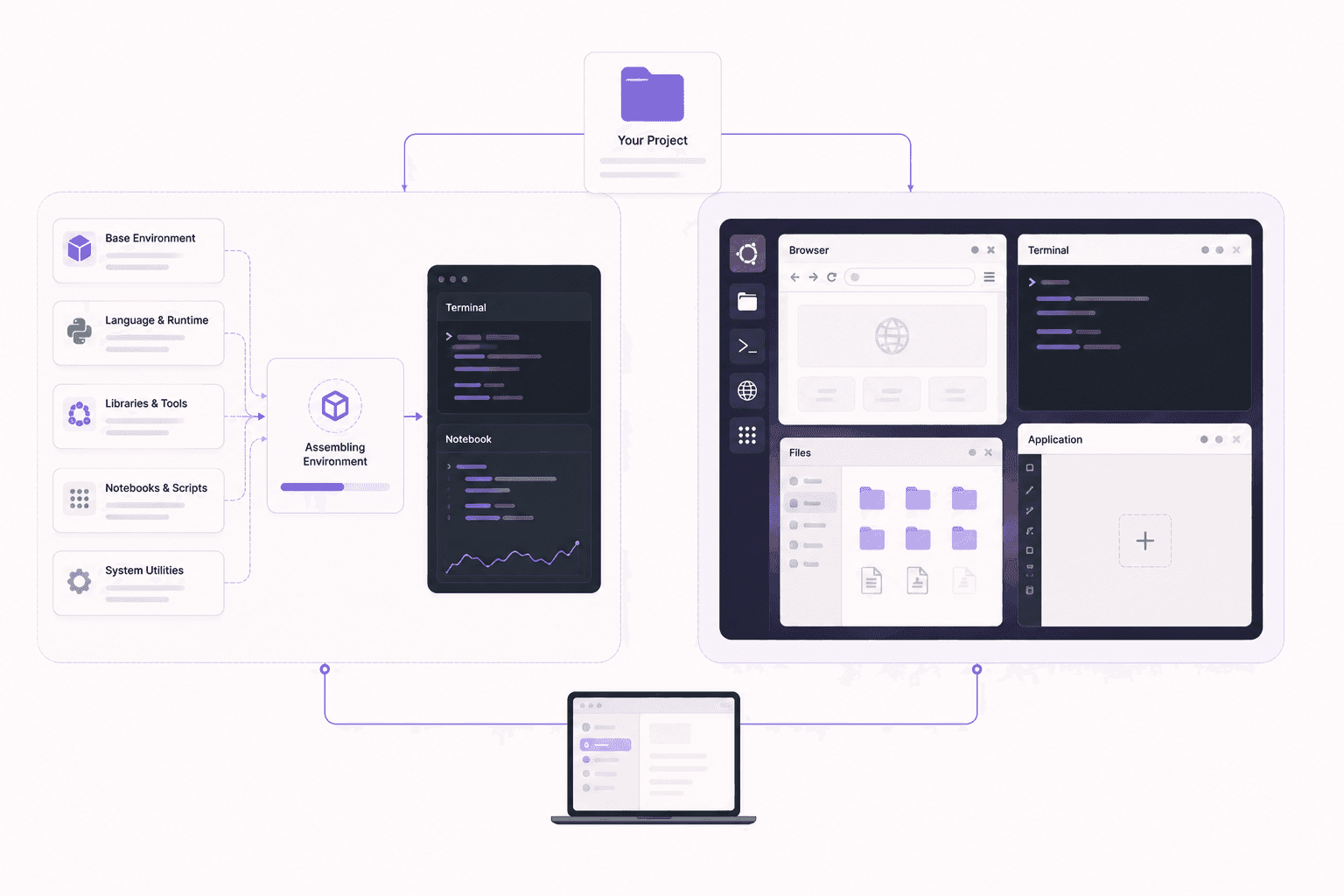
Neither approach is objectively right. They reflect the two different jobs the tools are built for: RunPod for reproducible compute pods, Vagon for a real computer you operate directly. Your comfort with containers, and whether you want to look at a desktop, largely decides which feels better.
Which Is Better For AI Agents?
This is an increasingly common question, so it deserves its own answer.
If you want to watch an agent drive a browser and take over when it's stuck, Vagon's desktop and isolation are a natural fit. You see the agent work in real time, you can grab the mouse when it hits an obstacle, and the isolated VM contains the risk of any plugin the agent installs. That combination of watchability and containment is exactly what a full desktop provides and a headless pod does not.
If your agent is purely headless, for example a backend process that calls a model and needs raw compute with no GUI involved, RunPod's cheaper pods work fine and cost less. There's nothing to watch, so you don't need a desktop.
So it comes back to the same theme: whether you want to see the work. Agents that do visual, browser-based, or GUI work benefit from Vagon. Agents that are pure headless compute are cheaper on RunPod.
If you’re experimenting with private AI models, this guide walks through how to run Ollama in the cloud.
Which Is Better For 3D And Creative Work?
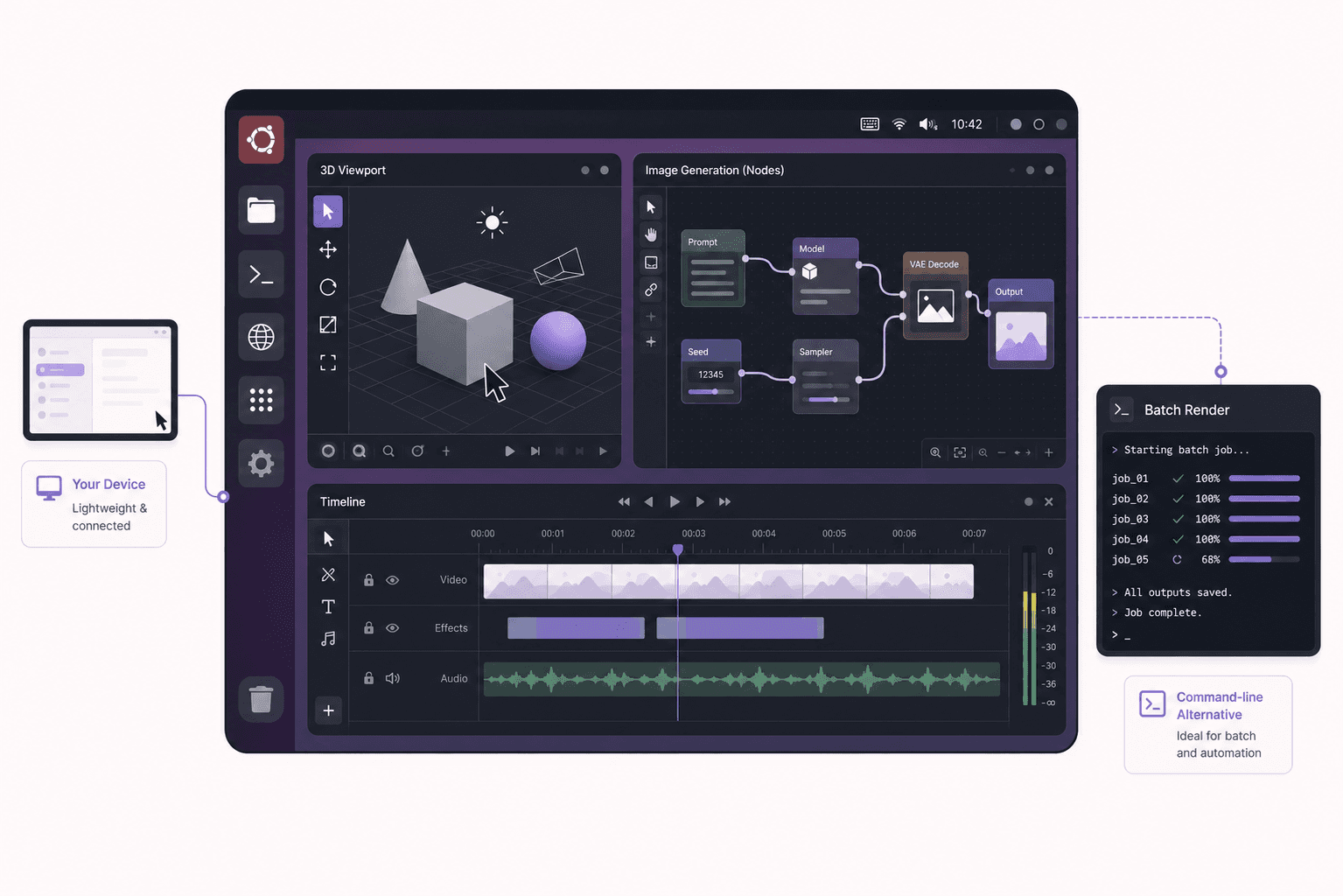
For Blender, ComfyUI, video editing, and other creative tools, the desktop makes a real difference.
These tools are built around a graphical interface you interact with constantly: a viewport you orbit around, a node graph you wire together, a timeline you scrub. On a full desktop, they run as intended, smoothly and responsively. On a headless pod, you're either limited to command-line rendering or rigging up remote desktop access yourself, which is extra work and a rougher experience.
Vagon's desktop, streamed at up to 4K and 60 frames per second, is designed for exactly this kind of interactive visual work, which is why creative workflows are a natural fit. RunPod can certainly render a Blender scene from the command line, and for pure batch rendering that's fine, but for the interactive part of creative work, a desktop wins clearly.
Two Different Philosophies Of The GPU Cloud
Underneath the feature differences, RunPod and Vagon represent two genuinely different ideas about what cloud GPU access should be, and understanding that makes the choice clearer.
RunPod's philosophy is compute as a commodity. A GPU is a resource you rent as efficiently as possible, spin up for a job, and release. The container model reflects this: your environment is defined as an image, the pod is ephemeral, and everything is optimized around getting cycles cheaply and reproducibly. It's a philosophy that fits engineers who think in terms of jobs, images, and throughput, and who don't need or want a screen in the loop.
Vagon's philosophy is a computer you can use. A GPU machine isn't just a pool of cycles, it's a full desktop you sit down at, look at, and operate like any other computer, only it happens to live in the cloud and stream to you. The desktop model reflects this: you install apps, open windows, watch things happen, and drive it from whatever device you have. It's a philosophy that fits people who think in terms of applications and interfaces rather than jobs and images.
Neither philosophy is superior; they serve different mental models and different work. The reason this matters is that the philosophy, not just the feature list, determines which tool will feel right. If "an efficient compute pod" describes what you want, RunPod's whole design will feel natural. If "a real computer in the cloud" describes it, Vagon's will. Fighting a tool's underlying philosophy is where frustration comes from, so choosing the one that matches how you think about the work is worth more than any single feature.
If you’re building node-based image generation workflows, here’s how to run ComfyUI in the cloud with access to more powerful GPUs.
Detailed Use Cases: Which Tool For Which Project
Abstract comparisons only go so far, so here are concrete projects and the better fit for each.
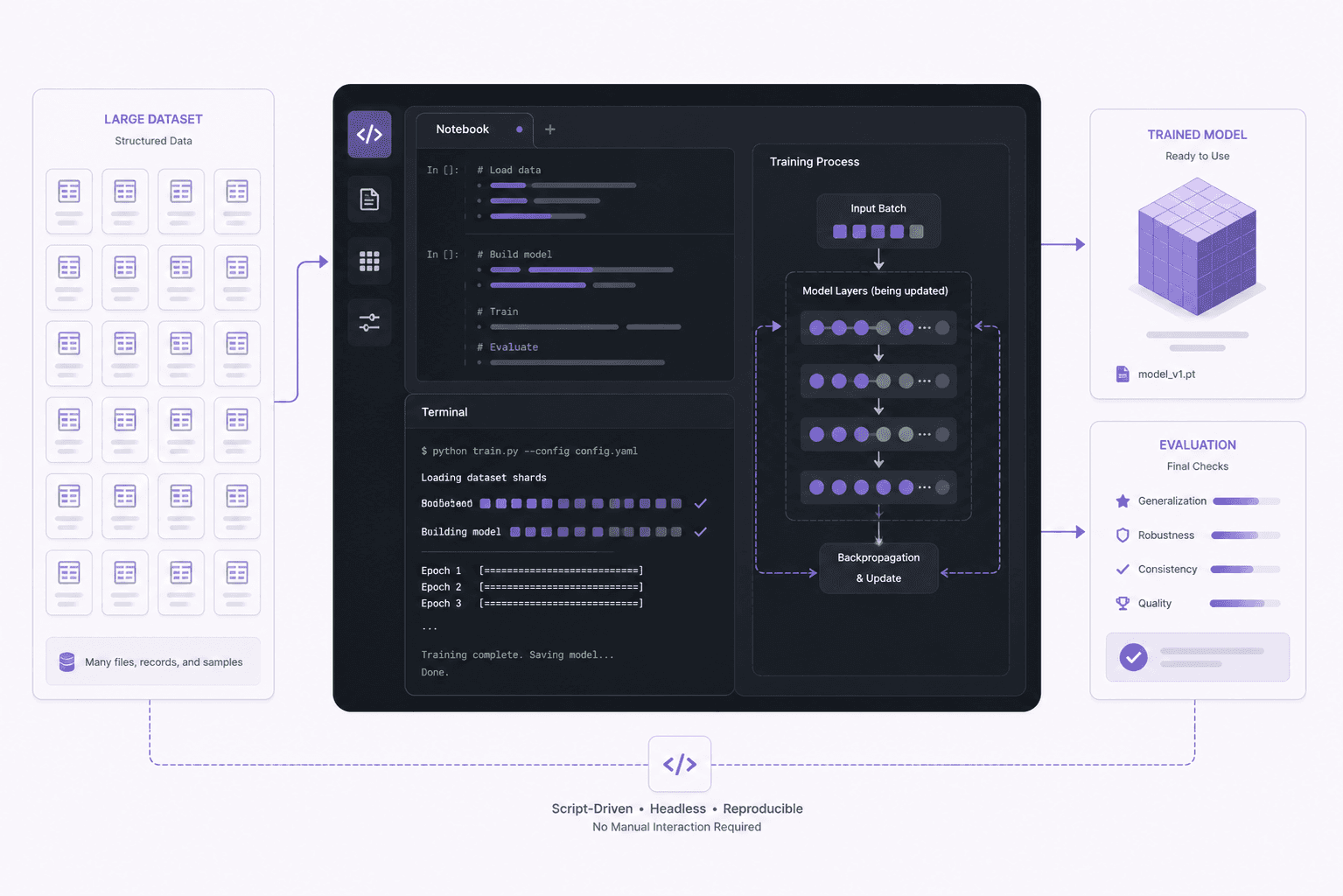
Fine-tuning a model on a large dataset
This is headless, throughput-bound work. You want the cheapest capable GPU, you'll drive it from a script or notebook, and there's nothing to watch. RunPod's cheaper compute and broad card selection make it the sensible pick. A desktop would be overhead you'd never use.
Building and debugging a browser-automation agent
This is visual, interactive work where seeing the browser is the whole point. Vagon's desktop lets you watch the agent, take over when it's stuck, and contain it in an isolated VM. RunPod's headless pod can't show you the browser in action, so Vagon fits.
Rendering a Blender animation
If it's pure batch rendering from the command line, either can do it, and RunPod may be cheaper for the raw compute. If you also want to set up and tweak the scene interactively, adjust materials, and preview, Vagon's desktop makes that part far more pleasant, so it depends on whether you want the interactive side too.
Running Jupyter notebooks for data science
Both work. RunPod gives you a notebook directly and cheaply. Vagon gives you a notebook plus a full desktop with a browser, a file manager, and GUI tools alongside, which some people strongly prefer. If the notebook is all you need, RunPod is leaner; if you want the surrounding desktop, Vagon.
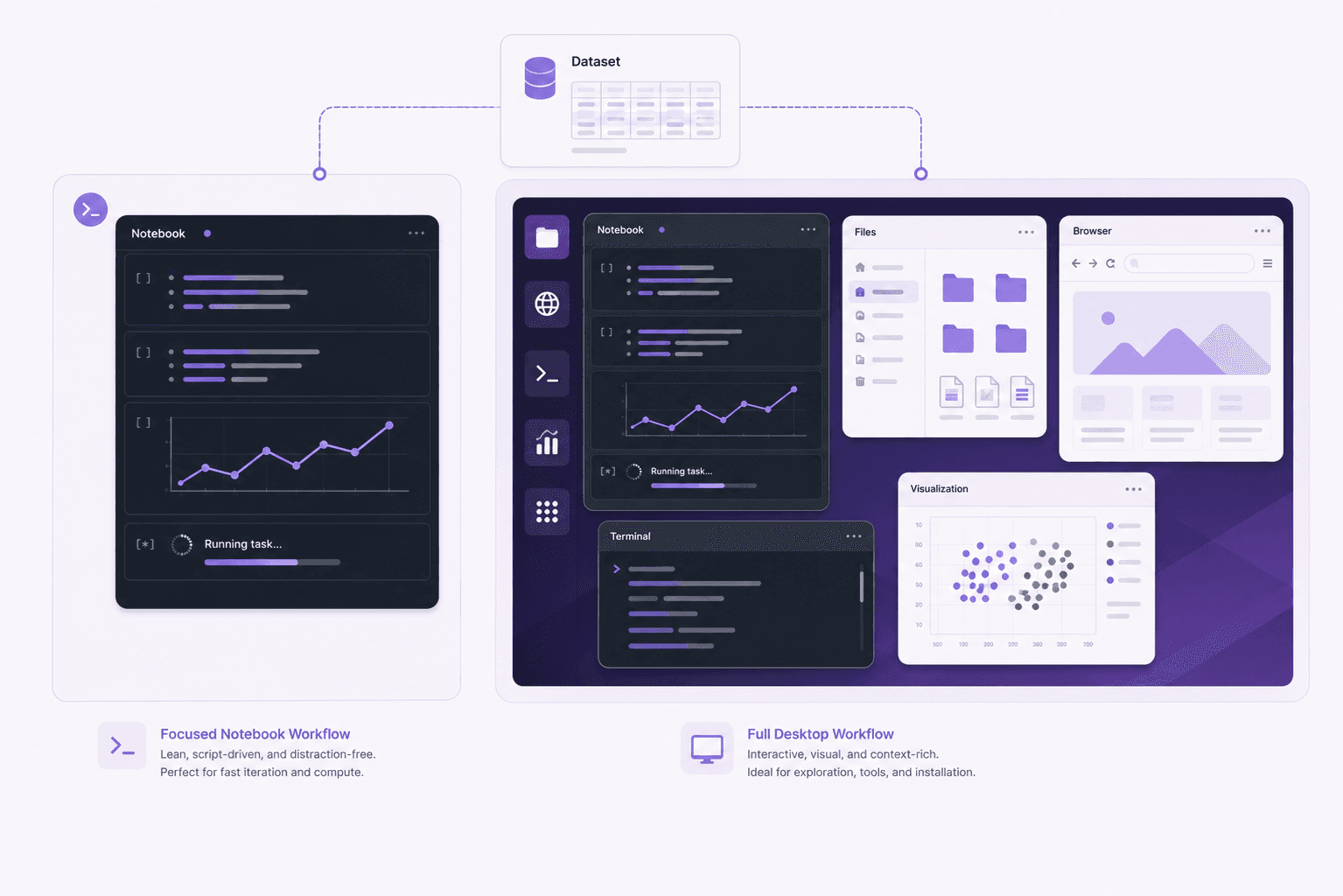
Generating images with ComfyUI
ComfyUI's node editor is highly visual and interactive. Vagon's desktop, where you open ComfyUI in a real browser and work smoothly, fits this naturally. RunPod can run it, but you'd be managing port access to a headless machine, which is more friction for a fundamentally graphical tool.
Working from an iPad or a light laptop
If your own device is thin, Vagon's any-device streaming is a decisive advantage, since you can drive a powerful GPU machine from a tablet. RunPod expects you to connect from a machine capable of a proper SSH or notebook session.
If you’re working on demanding 3D scenes or rendering projects, this guide explains how to run Blender on a cloud GPU with Ubuntu.
Can You Use Both?
Yes, and some people sensibly do, because they cover different needs.
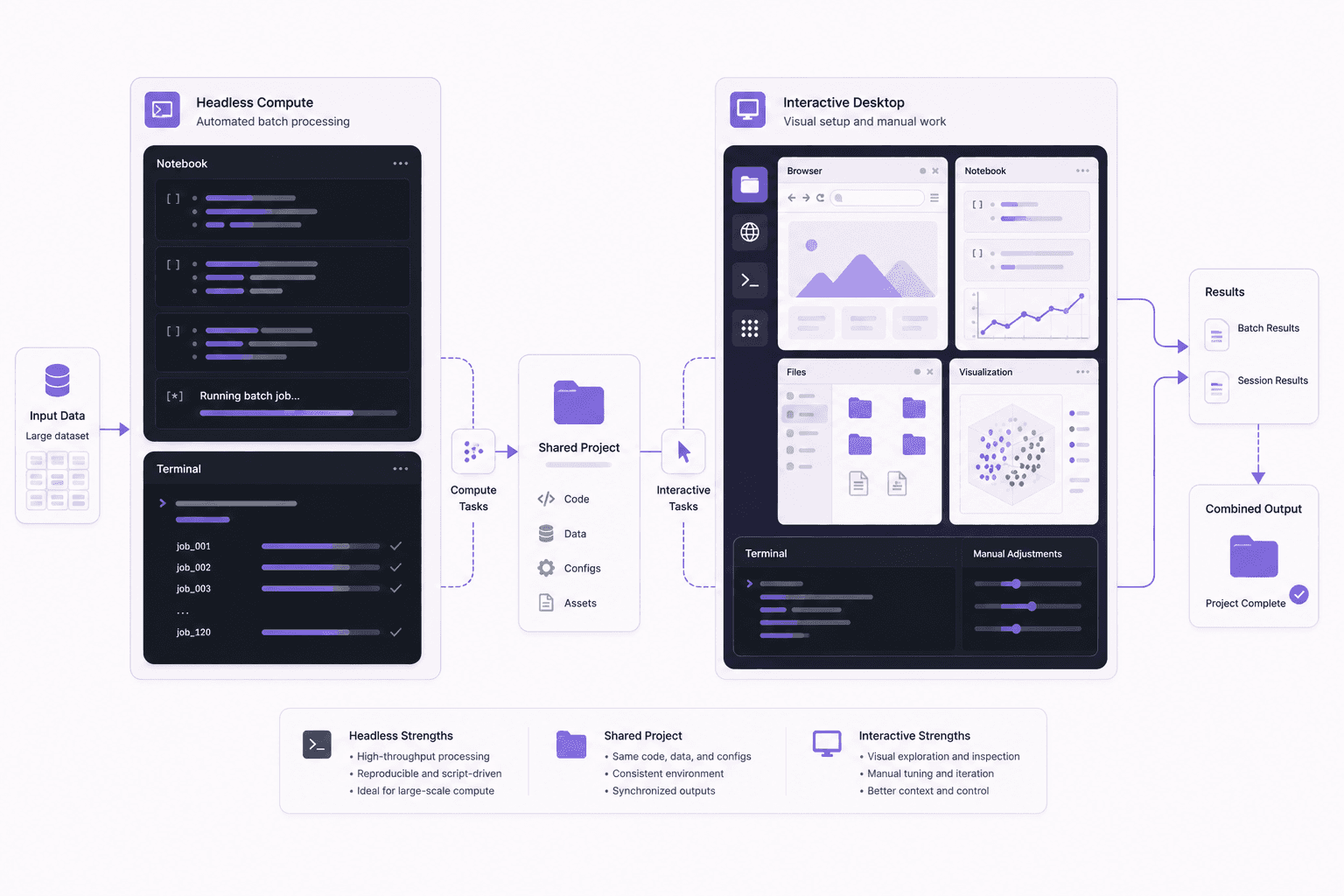
A reasonable pattern is to use RunPod for the heavy, headless, cost-sensitive compute jobs, large training runs, batch inference, throughput-bound work, and use Vagon for the interactive, visual, and watchable work, developing agents, creative tools, notebooks alongside GUI apps, and anything you want to drive from a thin device. There's no rule that says you must pick one provider for everything.
Because both bill by usage and neither locks you into an always-on commitment, mixing them is low-friction. Use the cheaper compute pod when you just need cycles, and the full desktop when you need to see and operate the machine. Matching each tool to the jobs it's best at usually beats forcing one tool to do everything.
Performance Considerations
A quick note on performance, since it's often assumed the cheaper option must be slower or the desktop must add overhead.
For raw GPU throughput on a given card, both deliver the performance of the hardware you rent; a T4 is a T4 and an A10G is an A10G regardless of the wrapper around it. The meaningful performance differences aren't in the GPU itself but in the experience. RunPod's headless model means no streaming overhead, since there's no desktop to stream, which is irrelevant to compute speed but means nothing to watch. Vagon streams a desktop, and that stream's smoothness depends on your internet connection, which affects how the interface feels but not how fast the GPU computes.
In other words, choose based on the experience you want, not on a fear that one is secretly slower at the actual GPU work. The card does the same work either way; the difference is whether you're watching it on a desktop or driving it headless.
A Simple Way To Decide
Ask yourself one question. Will I be looking at a screen, or just running compute?
If you'll be looking at a screen, dragging things around, watching something happen, or using a GUI app, you want a desktop, and Vagon is built for that. If you'll never look at a desktop and you just want cheap GPU cycles behind a notebook or an SSH session, you want a pod, and RunPod is built for that.
That single question resolves most of the decision. The rest is details.
If you’re testing private or open-source AI models, you can also learn how to run a local LLM on Ubuntu in the cloud.
What About Teams?
If you're choosing for a team rather than yourself, a couple of extra considerations come into play.
For a team of ML engineers running training and inference jobs, RunPod's container model has appeal because environments are reproducible and everyone can spin up the same image. The workflow standardizes well around defined images and shared templates, which suits an engineering team that already thinks in those terms.
For a team that needs managed desktops, where people want a real computer they can see and operate, and an organization wants centralized control, Vagon offers team management with features like assigning machines to members, centralized file sharing, and session management across both Linux and Windows workstations from one place. That's a different shape of need: not "give my engineers reproducible compute pods" but "give my people managed cloud computers." Which matters more depends on whether your team's work is headless compute or interactive desktop work, and many organizations have both kinds of need.

A Note On Lock-In And Flexibility
One reassuring thing about both providers is that neither demands a long commitment. Because both bill by usage, you can try either for a real workload without signing up for a monthly plan, and you can stop whenever. That makes the decision lower-stakes than it might feel.
The practical implication is that you don't have to get this perfectly right on the first try. If you pick one and find your work would be better served by the other, switching is straightforward, since your code, models, and data are yours and portable. So while this guide gives you a framework to choose well up front, the real test is running your actual workload on the one that seems to fit and seeing how it feels. The right answer often becomes obvious the moment you try to do your specific work and either appreciate the desktop or find it's overhead you don't need.
Common Misconceptions
A few misunderstandings come up repeatedly when people compare these two, so let's clear them up.
"The cheaper one is always the better deal." Only if you'd use nothing beyond raw compute. Paying less per GPU-hour is a genuine win when you're doing headless work, but if you actually need a desktop, watching an agent, running a GUI app, driving the machine from a tablet, then the cheaper headless option can't do the job at all, and its lower price is irrelevant. The better deal is the one that fits the work.
"A desktop must add a lot of overhead to the GPU." It doesn't. The GPU computes at the speed of the hardware regardless of whether there's a desktop around it. The desktop is streamed to you and its smoothness depends on your connection, but it doesn't slow the actual GPU work.
"You have to commit to one provider." You don't. Both bill by usage with no long commitment, your code and data are portable, and plenty of people use each for the jobs it's best at. Trying your real workload on each is low-risk.
"RunPod is only for experts and Vagon is only for beginners." Neither is true. RunPod suits anyone comfortable with notebooks and containers, beginner or expert, who wants cheap compute. Vagon suits anyone who wants a real desktop, beginner or expert, who values seeing and driving the machine. The split is about the kind of work and the mental model you prefer, not skill level.
"They're basically the same thing with different pricing." They're genuinely different products. One is a headless compute pod, the other is a full desktop computer. That difference in kind, not just price, is the whole point of the comparison.
If you want more visibility into what an autonomous workflow is doing, this guide shows how to watch your AI agent work on a cloud desktop.
The Short Version
RunPod and Vagon aren't really competitors so much as different tools that both happen to rent NVIDIA GPUs. RunPod is a headless GPU pod for cheap raw compute you drive from a terminal. Vagon is a full GPU Ubuntu desktop you see, drive, and watch from any device. Pick RunPod for the cheapest headless cycles. Pick Vagon when the work is visual, interactive, or something you want to watch, and when you want a real computer in the cloud rather than a compute pod.
Curious what the desktop side feels like? Create a Vagon account, launch a GPU Ubuntu machine, and see whether a real cloud desktop fits your workflow better than a headless pod.
Frequently Asked Questions
Is Vagon a RunPod alternative?
For some workloads, yes, but they're built for different jobs. Vagon is a full desktop you see and drive; RunPod is a headless compute pod. If you want a desktop experience, Vagon is the alternative; if you want the cheapest headless compute, RunPod is the better fit.
Can't I just install a desktop on a RunPod pod?
You can rig up remote desktop access on many headless providers, and people do. But it's setup you have to do and maintain, and the streaming experience won't match a service built around desktop streaming from the start. If a smooth desktop is what you want, starting with a desktop product saves the hassle.
Does Vagon have the same high-end GPUs as RunPod?
RunPod's catalog of top-tier training cards is broader. Vagon offers solid NVIDIA options like the T4 and A10G, plus higher plans, aimed at desktop, creative, and inference workloads rather than maxing out raw training throughput on the biggest cards. If you specifically need the largest data-center GPUs for heavy training, check each provider's current lineup.
Which is cheaper overall?
For raw GPU-hours, usually RunPod. For a full desktop experience you'd otherwise have to build yourself, Vagon gives you more per dollar. Cheaper depends entirely on whether you need the desktop.
Which is better for machine learning?
For headless training and inference where cost per GPU-hour is the priority, RunPod. For ML work where you want a desktop, notebooks alongside GUI tools, and the ability to watch and interact, Vagon. Many ML workflows fit either; the deciding factor is whether you want a desktop.
Do both bill by usage?
Yes. Both reward turning the machine off when you're done. Neither is the right pick for a 24/7 always-on service, where a cheap dedicated server wins.
Can I use Vagon from an iPad or Chromebook?
Yes. Because Vagon streams a desktop, you can drive a powerful GPU machine from a thin device. RunPod expects you to connect from a machine capable of an SSH or notebook session.
Is RunPod's per-second billing a big advantage?
For workloads made of many short bursts, per-second billing is more granular and can save a little. For longer sessions, the difference between per-second and per-minute billing is minor compared to the bigger question of whether you need a desktop at all.
Which should a beginner choose?
If you're new and want something that feels like a normal computer, Vagon's desktop is more approachable, with no container concepts to learn. If you're comfortable with notebooks and containers and want the cheapest compute, RunPod is a fine start.
Can I run creative apps like Blender or ComfyUI on RunPod?
You can render Blender from the command line and run ComfyUI by managing port access to a headless pod, but the interactive, graphical parts of these tools are more comfortable on a real desktop. For the visual side of creative work, Vagon's desktop is the smoother fit.
Does the desktop slow down the GPU on Vagon?
No. The GPU does the same work at the same speed regardless of the desktop. The desktop is streamed to you, and how smooth that stream feels depends on your internet connection, but it doesn't affect how fast the GPU computes.
Which is better for someone who wants to watch their AI agent?
Vagon, clearly. Watching an agent drive a browser and taking over when it's stuck requires a real desktop you can see and control, which a headless pod doesn't provide. The isolated VM also contains the risk of any plugin the agent installs.
Do I need to know Docker to use RunPod?
RunPod is container-native, so some comfort with container images and templates helps, though many workflows use ready-made templates. Vagon avoids this entirely, since it's a regular desktop where you install software normally.
Can I switch from one to the other later?
Yes. Your code, models, and data are portable, and neither provider requires a long commitment since both bill by usage. Trying your real workload on each is a low-stakes way to see which fits.
Quick answer: RunPod gives you a headless GPU pod optimized for cheap raw compute, driven from a terminal or notebook. Vagon gives you a full GPU Ubuntu desktop you can see and drive from any device. Choose RunPod for the lowest cost per GPU-hour on headless training and inference. Choose Vagon when your work is visual or interactive, such as 3D, image generation, browser automation, or a watchable agent, and you want a real computer rather than a compute pod.
Key Takeaways
RunPod optimizes for raw GPU price with per-second billing and a broad catalog of high-end cards.
Vagon optimizes for a real desktop experience you can see, drive, and access from any device.
RunPod is headless, so you work through a terminal or a notebook; Vagon is a full graphical desktop.
For visual or interactive work, 3D, node-based image generation, GUI apps, watchable agents, Vagon fits better.
For the cheapest headless training and inference, RunPod usually wins on cost per GPU-hour.
Neither is a good 24/7 always-on server; both bill by usage and reward shutting down.
A comparison written by one of the two vendors deserves a healthy dose of suspicion, so here is mine right at the top. RunPod is good at what it does, and for a lot of workloads it's the right choice over Vagon. This isn't going to be a piece where the competitor mysteriously loses every round. It's going to be an actual guide to which tool fits which job, because they're built for different things and picking the wrong one just wastes your money.
Both give you an NVIDIA GPU in the cloud. That's where the similarity ends. The difference is what wraps around that GPU, and that difference should decide which one you pick.
The One-Sentence Version
RunPod gives you a headless GPU pod optimized for raw compute at a low per-hour price. Vagon gives you a full GPU Ubuntu desktop you can see and drive from any device. If you want the cheapest possible tokens or training throughput and you live in a terminal and a notebook, RunPod is likely your answer. If you want a real desktop, a graphical workflow, and something you can watch and operate like a normal computer, Vagon is built for that.
Now let's get specific.
What RunPod Is Great At
Credit where it's due.
Low per-hour GPU pricing
RunPod's whole model is efficient access to GPUs, including high-end cards, at competitive hourly and per-second rates. If your metric is dollars per GPU-hour, RunPod is hard to beat, especially for the big training and inference cards. For cost-sensitive raw compute, that's a genuine strength.
Per-second billing
RunPod bills very granularly. For short, spiky jobs that's genuinely efficient, because you pay for the seconds you use rather than rounding up. If your workload is many brief bursts, that granularity adds up in your favor.
A big catalog of GPUs
From mid-range cards up to top-tier data-center GPUs, RunPod offers a wide range. If you specifically need a particular high-end card for heavy training, there's a good chance they have it, and often in multiple regions.
Container and template workflow
RunPod is container-native. You pick a template, it spins up, and you get a Jupyter interface or an SSH connection. For ML engineers comfortable with that flow, it's fast, reproducible, and familiar. Defining your environment as a container image means you can recreate it reliably.
If your work is headless training, batch inference, or notebook-driven experimentation, and your top priority is cost per GPU-hour, RunPod is a strong, sensible choice. I'm not going to pretend otherwise.
If you’re looking for a full Linux environment without setting up local hardware, this guide explains how to get an Ubuntu desktop in the cloud.
What Vagon Is Great At
Now the other side.
A full desktop you can see and drive
This is the core difference. Vagon isn't a headless pod with a notebook tab. It's a complete Ubuntu GNOME desktop, streamed to your browser, iPad, or Mac at up to 4K and 60 frames per second. You open real applications, drag windows, use a file manager, run a browser. For any workflow that's visual or interactive, that's a fundamentally nicer experience than tunneling a port into a headless box.
Tools that want a GUI
Some work is just better with a screen. Blender's viewport. ComfyUI's node editor. A browser-driving AI agent you want to watch. A creative app. A database GUI. On Vagon these run the way they were designed to, on a desktop, not squeezed through a forwarded port. If your daily work involves looking at things and clicking on them, that matters enormously.
Any device, including thin ones
Because Vagon streams a desktop, you can drive a powerful GPU Linux machine from an iPad, a Chromebook, or an old laptop. The device in your hands doesn't need to be powerful. That's a different promise from "SSH in from your workstation," and it's genuinely freeing if you want to work from a tablet or a light laptop.
Isolated, disposable, and easy to reset
Every Vagon machine is a separate VM you can reset to a clean image. That's great for running things you don't fully trust, like an autonomous agent installing its own packages, without risking your real environment.
Simple, no-container workflow
Launch a machine, pick Ubuntu, and in about 90 seconds you have a working desktop. No container mental model required. For people who want "a Linux computer in the cloud" rather than "a compute pod," that simplicity is the point.
Feature Comparison Table
Feature | RunPod | Vagon |
|---|---|---|
Interface | Headless (terminal, notebook, SSH) | Full Ubuntu GNOME desktop |
See and drive a GUI | No | Yes, streamed up to 4K/60 |
Access from thin devices | Via SSH from a capable machine | Yes, iPad, Chromebook, browser |
GPU catalog | Broad, including top-tier training cards | NVIDIA T4, A10G, and higher plans |
Billing granularity | Per second | Per minute |
Raw GPU price | Very competitive | Higher (you're paying for the desktop too) |
Environment model | Container templates | A real machine you set up |
Best for | Cheap headless compute | Visual, interactive, watchable work |
Isolation | Container on a host | Separate VM, resettable |
24/7 always-on server | Not the point | Not the point |
Where Each One Honestly Wins
Let me put it plainly, job by job.
Choose RunPod if
Your priority is the lowest possible cost per GPU-hour.
You're doing headless training or batch inference and are happy in a terminal and a notebook.
You need a specific high-end data-center GPU for heavy training.
Per-second billing on short spiky jobs matters to you.
You don't need a desktop, a GUI, or to watch anything happen.
Choose Vagon if
You want a real desktop you can see and operate, not a headless pod.
Your work is visual or interactive: 3D, image generation with a node UI, creative apps, browser automation, a watchable AI agent.
You want to drive a GPU Linux machine from an iPad, Chromebook, or weak laptop.
You value an isolated, disposable VM you can reset in one click.
You want "a Linux computer in the cloud" without a container workflow.
The Cost Conversation
Here's where I'll be direct, because cost is usually the real question.
RunPod generally wins on raw price per GPU-hour. If you're renting a card purely for compute and you'll drive it from a terminal, RunPod's per-hour and per-second pricing is very efficient. Vagon isn't trying to be the cheapest raw-compute provider, and pretending otherwise would insult your intelligence.
What Vagon charges for is the desktop, the streaming, the any-device access, the isolation, and the "it just works as a computer" experience. For workflows where those things matter, that's real value. For workflows where they don't, you're paying for a desktop you'd never look at, and RunPod is the better deal.
It's worth thinking about total value rather than only the sticker price per hour, though. If a real desktop saves you setup time, lets you work visually, and means you can drive the machine from a tablet, that convenience has worth. And if it doesn't, if you'd genuinely never open the desktop, then it's pure overhead and you should take RunPod's cheaper compute. The honest framing is: pay for the desktop when you'll use it, and don't when you won't.
Both bill by usage, so both reward shutting the machine down when you're done. Neither is a good choice for parking a lightweight always-on service around the clock; that's what a cheap dedicated VPS is for, and it beats both of these for that specific job.
If you’re working from a tablet, you can learn how to run Ubuntu on an iPad and access a complete Linux desktop remotely.
What Setup Actually Feels Like On Each
A practical difference that doesn't show up in a pricing table but matters day to day.
On RunPod, you're working in a container mindset. You pick a template or an image, the pod spins up, and you connect through a Jupyter tab or SSH. For people fluent in that workflow it's fast and clean, and the reproducibility of container images is a real plus for teams. For people who aren't steeped in containers, there's a small learning curve around images, volumes, and exposing ports.
On Vagon, there's no container mental model to learn. You pick Ubuntu, choose a plan, and about 90 seconds later you're looking at a desktop. You install software the way you would on any Linux machine, open apps, and work. If "just give me a Linux computer" is what you want, that simplicity is the appeal. If you specifically want reproducible container images defined as code, RunPod's model suits that better.
Neither approach is objectively right. They reflect the two different jobs the tools are built for: RunPod for reproducible compute pods, Vagon for a real computer you operate directly. Your comfort with containers, and whether you want to look at a desktop, largely decides which feels better.
Which Is Better For AI Agents?
This is an increasingly common question, so it deserves its own answer.
If you want to watch an agent drive a browser and take over when it's stuck, Vagon's desktop and isolation are a natural fit. You see the agent work in real time, you can grab the mouse when it hits an obstacle, and the isolated VM contains the risk of any plugin the agent installs. That combination of watchability and containment is exactly what a full desktop provides and a headless pod does not.
If your agent is purely headless, for example a backend process that calls a model and needs raw compute with no GUI involved, RunPod's cheaper pods work fine and cost less. There's nothing to watch, so you don't need a desktop.
So it comes back to the same theme: whether you want to see the work. Agents that do visual, browser-based, or GUI work benefit from Vagon. Agents that are pure headless compute are cheaper on RunPod.
If you’re experimenting with private AI models, this guide walks through how to run Ollama in the cloud.
Which Is Better For 3D And Creative Work?
For Blender, ComfyUI, video editing, and other creative tools, the desktop makes a real difference.
These tools are built around a graphical interface you interact with constantly: a viewport you orbit around, a node graph you wire together, a timeline you scrub. On a full desktop, they run as intended, smoothly and responsively. On a headless pod, you're either limited to command-line rendering or rigging up remote desktop access yourself, which is extra work and a rougher experience.
Vagon's desktop, streamed at up to 4K and 60 frames per second, is designed for exactly this kind of interactive visual work, which is why creative workflows are a natural fit. RunPod can certainly render a Blender scene from the command line, and for pure batch rendering that's fine, but for the interactive part of creative work, a desktop wins clearly.
Two Different Philosophies Of The GPU Cloud
Underneath the feature differences, RunPod and Vagon represent two genuinely different ideas about what cloud GPU access should be, and understanding that makes the choice clearer.
RunPod's philosophy is compute as a commodity. A GPU is a resource you rent as efficiently as possible, spin up for a job, and release. The container model reflects this: your environment is defined as an image, the pod is ephemeral, and everything is optimized around getting cycles cheaply and reproducibly. It's a philosophy that fits engineers who think in terms of jobs, images, and throughput, and who don't need or want a screen in the loop.
Vagon's philosophy is a computer you can use. A GPU machine isn't just a pool of cycles, it's a full desktop you sit down at, look at, and operate like any other computer, only it happens to live in the cloud and stream to you. The desktop model reflects this: you install apps, open windows, watch things happen, and drive it from whatever device you have. It's a philosophy that fits people who think in terms of applications and interfaces rather than jobs and images.
Neither philosophy is superior; they serve different mental models and different work. The reason this matters is that the philosophy, not just the feature list, determines which tool will feel right. If "an efficient compute pod" describes what you want, RunPod's whole design will feel natural. If "a real computer in the cloud" describes it, Vagon's will. Fighting a tool's underlying philosophy is where frustration comes from, so choosing the one that matches how you think about the work is worth more than any single feature.
If you’re building node-based image generation workflows, here’s how to run ComfyUI in the cloud with access to more powerful GPUs.
Detailed Use Cases: Which Tool For Which Project
Abstract comparisons only go so far, so here are concrete projects and the better fit for each.
Fine-tuning a model on a large dataset
This is headless, throughput-bound work. You want the cheapest capable GPU, you'll drive it from a script or notebook, and there's nothing to watch. RunPod's cheaper compute and broad card selection make it the sensible pick. A desktop would be overhead you'd never use.
Building and debugging a browser-automation agent
This is visual, interactive work where seeing the browser is the whole point. Vagon's desktop lets you watch the agent, take over when it's stuck, and contain it in an isolated VM. RunPod's headless pod can't show you the browser in action, so Vagon fits.
Rendering a Blender animation
If it's pure batch rendering from the command line, either can do it, and RunPod may be cheaper for the raw compute. If you also want to set up and tweak the scene interactively, adjust materials, and preview, Vagon's desktop makes that part far more pleasant, so it depends on whether you want the interactive side too.
Running Jupyter notebooks for data science
Both work. RunPod gives you a notebook directly and cheaply. Vagon gives you a notebook plus a full desktop with a browser, a file manager, and GUI tools alongside, which some people strongly prefer. If the notebook is all you need, RunPod is leaner; if you want the surrounding desktop, Vagon.
Generating images with ComfyUI
ComfyUI's node editor is highly visual and interactive. Vagon's desktop, where you open ComfyUI in a real browser and work smoothly, fits this naturally. RunPod can run it, but you'd be managing port access to a headless machine, which is more friction for a fundamentally graphical tool.
Working from an iPad or a light laptop
If your own device is thin, Vagon's any-device streaming is a decisive advantage, since you can drive a powerful GPU machine from a tablet. RunPod expects you to connect from a machine capable of a proper SSH or notebook session.
If you’re working on demanding 3D scenes or rendering projects, this guide explains how to run Blender on a cloud GPU with Ubuntu.
Can You Use Both?
Yes, and some people sensibly do, because they cover different needs.
A reasonable pattern is to use RunPod for the heavy, headless, cost-sensitive compute jobs, large training runs, batch inference, throughput-bound work, and use Vagon for the interactive, visual, and watchable work, developing agents, creative tools, notebooks alongside GUI apps, and anything you want to drive from a thin device. There's no rule that says you must pick one provider for everything.
Because both bill by usage and neither locks you into an always-on commitment, mixing them is low-friction. Use the cheaper compute pod when you just need cycles, and the full desktop when you need to see and operate the machine. Matching each tool to the jobs it's best at usually beats forcing one tool to do everything.
Performance Considerations
A quick note on performance, since it's often assumed the cheaper option must be slower or the desktop must add overhead.
For raw GPU throughput on a given card, both deliver the performance of the hardware you rent; a T4 is a T4 and an A10G is an A10G regardless of the wrapper around it. The meaningful performance differences aren't in the GPU itself but in the experience. RunPod's headless model means no streaming overhead, since there's no desktop to stream, which is irrelevant to compute speed but means nothing to watch. Vagon streams a desktop, and that stream's smoothness depends on your internet connection, which affects how the interface feels but not how fast the GPU computes.
In other words, choose based on the experience you want, not on a fear that one is secretly slower at the actual GPU work. The card does the same work either way; the difference is whether you're watching it on a desktop or driving it headless.
A Simple Way To Decide
Ask yourself one question. Will I be looking at a screen, or just running compute?
If you'll be looking at a screen, dragging things around, watching something happen, or using a GUI app, you want a desktop, and Vagon is built for that. If you'll never look at a desktop and you just want cheap GPU cycles behind a notebook or an SSH session, you want a pod, and RunPod is built for that.
That single question resolves most of the decision. The rest is details.
If you’re testing private or open-source AI models, you can also learn how to run a local LLM on Ubuntu in the cloud.
What About Teams?
If you're choosing for a team rather than yourself, a couple of extra considerations come into play.
For a team of ML engineers running training and inference jobs, RunPod's container model has appeal because environments are reproducible and everyone can spin up the same image. The workflow standardizes well around defined images and shared templates, which suits an engineering team that already thinks in those terms.
For a team that needs managed desktops, where people want a real computer they can see and operate, and an organization wants centralized control, Vagon offers team management with features like assigning machines to members, centralized file sharing, and session management across both Linux and Windows workstations from one place. That's a different shape of need: not "give my engineers reproducible compute pods" but "give my people managed cloud computers." Which matters more depends on whether your team's work is headless compute or interactive desktop work, and many organizations have both kinds of need.
A Note On Lock-In And Flexibility
One reassuring thing about both providers is that neither demands a long commitment. Because both bill by usage, you can try either for a real workload without signing up for a monthly plan, and you can stop whenever. That makes the decision lower-stakes than it might feel.
The practical implication is that you don't have to get this perfectly right on the first try. If you pick one and find your work would be better served by the other, switching is straightforward, since your code, models, and data are yours and portable. So while this guide gives you a framework to choose well up front, the real test is running your actual workload on the one that seems to fit and seeing how it feels. The right answer often becomes obvious the moment you try to do your specific work and either appreciate the desktop or find it's overhead you don't need.
Common Misconceptions
A few misunderstandings come up repeatedly when people compare these two, so let's clear them up.
"The cheaper one is always the better deal." Only if you'd use nothing beyond raw compute. Paying less per GPU-hour is a genuine win when you're doing headless work, but if you actually need a desktop, watching an agent, running a GUI app, driving the machine from a tablet, then the cheaper headless option can't do the job at all, and its lower price is irrelevant. The better deal is the one that fits the work.
"A desktop must add a lot of overhead to the GPU." It doesn't. The GPU computes at the speed of the hardware regardless of whether there's a desktop around it. The desktop is streamed to you and its smoothness depends on your connection, but it doesn't slow the actual GPU work.
"You have to commit to one provider." You don't. Both bill by usage with no long commitment, your code and data are portable, and plenty of people use each for the jobs it's best at. Trying your real workload on each is low-risk.
"RunPod is only for experts and Vagon is only for beginners." Neither is true. RunPod suits anyone comfortable with notebooks and containers, beginner or expert, who wants cheap compute. Vagon suits anyone who wants a real desktop, beginner or expert, who values seeing and driving the machine. The split is about the kind of work and the mental model you prefer, not skill level.
"They're basically the same thing with different pricing." They're genuinely different products. One is a headless compute pod, the other is a full desktop computer. That difference in kind, not just price, is the whole point of the comparison.
If you want more visibility into what an autonomous workflow is doing, this guide shows how to watch your AI agent work on a cloud desktop.
The Short Version
RunPod and Vagon aren't really competitors so much as different tools that both happen to rent NVIDIA GPUs. RunPod is a headless GPU pod for cheap raw compute you drive from a terminal. Vagon is a full GPU Ubuntu desktop you see, drive, and watch from any device. Pick RunPod for the cheapest headless cycles. Pick Vagon when the work is visual, interactive, or something you want to watch, and when you want a real computer in the cloud rather than a compute pod.
Curious what the desktop side feels like? Create a Vagon account, launch a GPU Ubuntu machine, and see whether a real cloud desktop fits your workflow better than a headless pod.
Frequently Asked Questions
Is Vagon a RunPod alternative?
For some workloads, yes, but they're built for different jobs. Vagon is a full desktop you see and drive; RunPod is a headless compute pod. If you want a desktop experience, Vagon is the alternative; if you want the cheapest headless compute, RunPod is the better fit.
Can't I just install a desktop on a RunPod pod?
You can rig up remote desktop access on many headless providers, and people do. But it's setup you have to do and maintain, and the streaming experience won't match a service built around desktop streaming from the start. If a smooth desktop is what you want, starting with a desktop product saves the hassle.
Does Vagon have the same high-end GPUs as RunPod?
RunPod's catalog of top-tier training cards is broader. Vagon offers solid NVIDIA options like the T4 and A10G, plus higher plans, aimed at desktop, creative, and inference workloads rather than maxing out raw training throughput on the biggest cards. If you specifically need the largest data-center GPUs for heavy training, check each provider's current lineup.
Which is cheaper overall?
For raw GPU-hours, usually RunPod. For a full desktop experience you'd otherwise have to build yourself, Vagon gives you more per dollar. Cheaper depends entirely on whether you need the desktop.
Which is better for machine learning?
For headless training and inference where cost per GPU-hour is the priority, RunPod. For ML work where you want a desktop, notebooks alongside GUI tools, and the ability to watch and interact, Vagon. Many ML workflows fit either; the deciding factor is whether you want a desktop.
Do both bill by usage?
Yes. Both reward turning the machine off when you're done. Neither is the right pick for a 24/7 always-on service, where a cheap dedicated server wins.
Can I use Vagon from an iPad or Chromebook?
Yes. Because Vagon streams a desktop, you can drive a powerful GPU machine from a thin device. RunPod expects you to connect from a machine capable of an SSH or notebook session.
Is RunPod's per-second billing a big advantage?
For workloads made of many short bursts, per-second billing is more granular and can save a little. For longer sessions, the difference between per-second and per-minute billing is minor compared to the bigger question of whether you need a desktop at all.
Which should a beginner choose?
If you're new and want something that feels like a normal computer, Vagon's desktop is more approachable, with no container concepts to learn. If you're comfortable with notebooks and containers and want the cheapest compute, RunPod is a fine start.
Can I run creative apps like Blender or ComfyUI on RunPod?
You can render Blender from the command line and run ComfyUI by managing port access to a headless pod, but the interactive, graphical parts of these tools are more comfortable on a real desktop. For the visual side of creative work, Vagon's desktop is the smoother fit.
Does the desktop slow down the GPU on Vagon?
No. The GPU does the same work at the same speed regardless of the desktop. The desktop is streamed to you, and how smooth that stream feels depends on your internet connection, but it doesn't affect how fast the GPU computes.
Which is better for someone who wants to watch their AI agent?
Vagon, clearly. Watching an agent drive a browser and taking over when it's stuck requires a real desktop you can see and control, which a headless pod doesn't provide. The isolated VM also contains the risk of any plugin the agent installs.
Do I need to know Docker to use RunPod?
RunPod is container-native, so some comfort with container images and templates helps, though many workflows use ready-made templates. Vagon avoids this entirely, since it's a regular desktop where you install software normally.
Can I switch from one to the other later?
Yes. Your code, models, and data are portable, and neither provider requires a long commitment since both bill by usage. Trying your real workload on each is a low-stakes way to see which fits.
Get Beyond Your Computer Performance
Run applications on your cloud computer with the latest generation hardware. No more crashes or lags.
Trial includes 1 hour usage + 7 days of storage.
Summarize with AI

Ready to focus on your creativity?
Vagon gives you the ability to create & render projects, collaborate, and stream applications with the power of the best hardware.

Vagon Blog

Run heavy applications on any device with
your personal computer on the cloud.
San Francisco, California
Solutions
Vagon Teams
Vagon Streams
Use Cases
Resources
Vagon Blog
How to Automate Blender Tasks With GPT-6 Astra
GPT-6 Astra Blender Unreal Engine Workflow: Playable 3D
Reference Image to 3D Scene With GPT-6 Astra & Blender
What Is Application Streaming? How It Works in 2026
Best Digital Twin Platforms & Software (2026)
Best 3D Product Configurator Software in 2026
VDI Solutions Compared: How to Choose the Right VDI Solution
Citrix Pricing: License Cost and Hidden Hardware Expenses
Persistent VDI: Setup, Costs, and Trade-offs
Vagon Blog
Run heavy applications on any device with
your personal computer on the cloud.
San Francisco, California
Solutions
Vagon Teams
Vagon Streams
Use Cases
Resources
Vagon Blog
How to Automate Blender Tasks With GPT-6 Astra
GPT-6 Astra Blender Unreal Engine Workflow: Playable 3D
Reference Image to 3D Scene With GPT-6 Astra & Blender
What Is Application Streaming? How It Works in 2026
Best Digital Twin Platforms & Software (2026)
Best 3D Product Configurator Software in 2026
VDI Solutions Compared: How to Choose the Right VDI Solution
Citrix Pricing: License Cost and Hidden Hardware Expenses
Persistent VDI: Setup, Costs, and Trade-offs
Vagon Blog
Run heavy applications on any device with
your personal computer on the cloud.
San Francisco, California
Solutions
Vagon Teams
Vagon Streams
Use Cases
Resources
Vagon Blog